
Research
Choose the Best VPS for Forex EA: A Guide to Maximizing Uptime & Minimizing Latency
Dec
Choosing the best VPS for a Forex Expert Advisor (EA) involves prioritizing a server location close to your broker, securing at least 99.99% uptime, and selecting adequate hardware resources like CPU, RAM, and SSD storage. These factors work together to reduce latency, prevent missed trades from downtime, and make sure your automated strategy runs smoothly 24/7. A well-chosen Virtual Private Server acts as a dedicated, always-on computer, removing the reliability risks associated with a home internet connection or personal PC.
The most important factors to consider are the VPS provider’s data center locations and their uptime guarantee. A server located in the same city as your broker’s server, such as New York or London, can dramatically lower trade execution delay, or latency. At the same time, a high uptime guarantee is non-negotiable, as even a few minutes of disconnection can cause your EA to mismanage trades and lead to financial losses.
Top Forex VPS providers like ForexVPS.net, Beeks Financial Cloud, and New York City Servers offer specialized plans tailored for traders. These companies build their infrastructure in key financial hubs to offer the lowest possible latency to major brokers. Their plans typically scale based on the hardware resources provided, allowing you to choose a package that matches the number of trading platforms you intend to run.
This guide will walk you through the essential elements of a Forex VPS. We will explain why uptime and latency are fundamental for EA trading and break down the technical specifications you need to evaluate. You will learn how to compare providers and select a plan that gives your automated strategies the best possible environment for performance.
What is a Forex VPS and Why is it Essential for EA Trading?
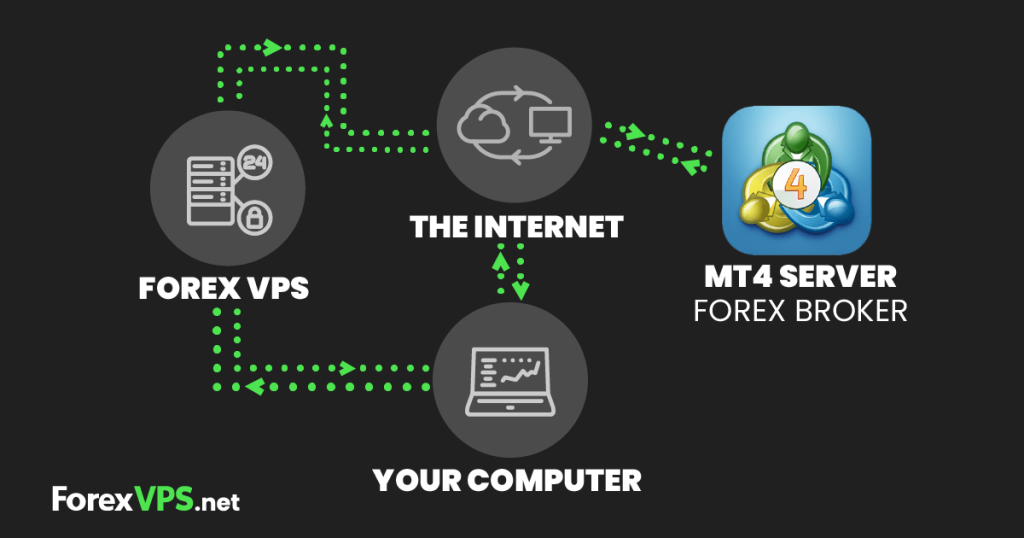
A Forex VPS (Virtual Private Server) is a remote, cloud-based server that runs its own copy of an operating system, providing a dedicated and stable environment for running automated trading software like Expert Advisors (EAs) 24 hours a day, 7 days a week. Its primary purpose is to eliminate the common points of failure that traders experience when running EAs on a home computer, such as internet disconnections, power outages, and system crashes.
To understand its role better, let’s look at the specific problems it solves for automated traders. Your EA needs to be connected to your broker’s servers without interruption to monitor the market, open trades, and manage existing positions. Any disruption can be costly. A Forex VPS is housed in a professional data center with redundant power supplies and multiple high-speed internet connections, offering a level of reliability that is nearly impossible to achieve at home. This constant connection is the foundation of successful automated trading, giving you peace of mind that your strategy is always active.

What Exactly is Latency in Forex Trading?
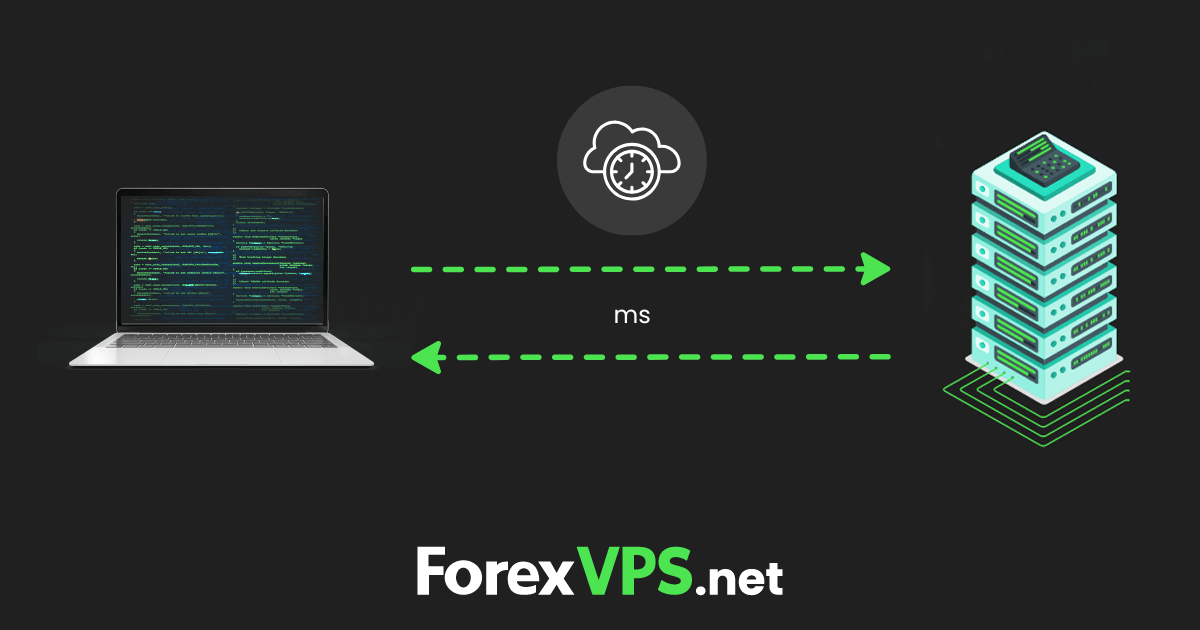
Latency in Forex trading is the time delay it takes for your trade order to travel from your trading platform to your broker’s server for execution, measured in milliseconds (ms). It is a direct measurement of speed. The lower the latency, the faster your order is received and processed, which can have a large impact on the final execution price of your trade. Think of it like a delay on an international phone call. Sometimes, there’s a noticeable lag between when you speak and when the other person hears you. In trading, that lag can mean the difference between getting the price you saw and getting a less favorable one.
To illustrate, let’s break down the journey of a trade order.
- Step 1: Your Expert Advisor identifies a trading opportunity and sends an order from your MetaTrader 4 or 5 platform.
- Step 2: The order travels over the internet from your VPS to your broker’s trade server. This is where most of the latency occurs.
- Step 3: The broker’s server receives the order and executes it.
- Step 4: A confirmation message travels back to your platform.
The total round-trip time is the latency. During volatile market conditions, prices can change in a fraction of a second. If you have high latency (e.g., 100 ms), the price might have already moved by the time your order reaches the broker. This phenomenon is called slippage. A low latency connection (e.g., 1-5 ms) helps to minimize slippage and improves the precision of your EA’s entries and exits.
Do You Really Need 100% Uptime for an Expert Advisor?
Yes, you absolutely need the highest possible uptime for an Expert Advisor because any period of disconnection, no matter how brief, can lead to missed trades, improper trade management, and direct financial loss. While true 100% uptime is technically impossible, a professional VPS provider’s guarantee of 99.99% uptime is the industry standard and is essential for reliable automated trading. This translates to less than one hour of potential downtime per year.

To understand why this is so important, consider the consequences of your EA going offline.
- Missed Trade Entries: The market moves 24 hours a day, five days a week. Your EA is designed to spot opportunities at any time. If your server reboots for a system update or your home internet connection drops for just five minutes, your EA could miss a perfect entry signal dictated by its strategy, resulting in a lost profit opportunity.
- Failed Trade Management: This is often more dangerous than missing an entry. Imagine your EA has an open position with a trailing stop loss. A trailing stop needs to be actively managed by the EA, which constantly sends update requests to the broker’s server as the price moves in your favor. If your VPS goes down, the EA can no longer update the stop loss, leaving your profits unprotected or potentially turning a winning trade into a losing one.
- Inability to Exit a Trade: Your EA might have logic to close a trade based on a specific indicator or market condition. If it’s offline, it cannot send the close order. The trade remains open, exposed to market volatility, and could hit its maximum stop loss when it might otherwise have been closed for a small gain or a smaller loss.
A home PC is vulnerable to power outages, internet service provider issues, and unexpected Windows updates that force a restart. A VPS is designed to avoid these problems, offering the stability your EA requires to perform its functions correctly and protect your capital.
What are the Key Factors to Consider When Choosing a Forex VPS?
The key factors to consider when choosing a Forex VPS are the server’s physical location relative to your broker, the hardware resources (CPU, RAM, and storage), the operating system, and the provider’s uptime guarantee. Evaluating these elements correctly will help you create a trading environment optimized for low latency and high reliability, allowing your Expert Advisors to function as intended. Each factor plays a distinct role in the overall performance of your automated trading system.
Let’s see how these factors contribute to a better trading setup. The location dictates the speed of communication with your broker, while the hardware resources determine how smoothly your trading software runs. The operating system provides the necessary platform compatibility, and the uptime guarantee provides the assurance that your system will remain online. Neglecting any one of these areas can create a bottleneck that undermines the effectiveness of your automated strategy. A balanced approach that gives proper attention to each factor is the best way to build a professional-grade trading environment.
What are the Most Important Technical Specifications for a Forex VPS?
There are four main groups of technical specifications for a Forex VPS: Server Location, Resources (CPU, RAM, SSD Storage), Operating System, and the Uptime Guarantee. These specifications are the foundation of a high-performance trading server. Getting them right is necessary for minimizing latency and maximizing stability for your automated trading strategies.
Here is a breakdown of what to look for in each category.
- Server Location: The single most important factor for reducing latency is the physical proximity of your VPS to your broker’s trading servers. Data travels at a finite speed, so a shorter distance means a faster connection. Major financial hubs like New York (near the NY4 data center), London (near the LD4 data center), and Tokyo are ideal locations because most major brokers house their servers there. Always ask your broker where their servers are located and choose a VPS provider with a data center in that same city.
- Resources: This category includes the processing power and memory of your server.
– CPU: A modern processor with at least 1-2 cores is sufficient for running a few instances of MetaTrader. More complex EAs or more platform instances will require more processing power.
– RAM: This is the server’s short-term memory. A minimum of 2GB of RAM is recommended for running 1-2 MetaTrader platforms smoothly. If you plan to run more, look for plans with 3-4GB of RAM or more.
– SSD Storage: Solid-State Drives (SSDs) are much faster than traditional Hard Disk Drives (HDDs). An SSD will make your server boot faster and allow your trading platform to load charts and process data more quickly. 25-30GB of SSD storage is plenty for the operating system and several trading platforms.
- Operating System: The industry standard for Forex trading is Windows Server. This is because the MetaTrader 4 and MetaTrader 5 platforms are designed to run on the Windows operating system. Most VPS providers offer pre-configured Windows Server installations, making setup quick and easy.
- Uptime Guarantee: Look for providers that offer an uptime guarantee of 99.99% or higher. This is a contractual promise of reliability. A 99.99% uptime means the server will be online for all but about 52 minutes over an entire year, which is a very high level of dependability for running an EA.
How Does Server Location Compare to Server Hardware in Importance?
Server location is more important than server hardware for the performance of most Forex EAs, as low latency is the primary factor for good trade execution, and it can only be achieved through physical proximity. While powerful hardware is necessary for the smooth operation of your trading platform, it cannot compensate for the physical delay caused by a long distance between your VPS and your broker’s server. A faster processor cannot make data travel faster across the Atlantic Ocean.

Let’s compare their impact directly.
- Server Location (Latency): This directly affects your trade execution speed. A VPS in New York connecting to a broker in New York might have a latency of 1-5 milliseconds. A VPS in Los Angeles connecting to the same broker might have a latency of 60-70 milliseconds. During a fast-moving market event, that 60ms delay is enough for the price to change, leading to slippage. You cannot fix high latency by adding more RAM or a faster CPU. The only solution is to shorten the physical distance.
- Server Hardware (Processing Power): This affects how well your software runs on the VPS itself. Inadequate hardware, such as too little RAM, can cause the Windows operating system to become slow or the MetaTrader platform to freeze or crash. This is also a point of failure. However, most standard VPS plans offer more than enough resources (e.g., 2GB RAM, 1-2 CPU cores) to run several instances of MetaTrader without any issues.
For the vast majority of traders, the priority should be: first, find a VPS provider with a data center in the same city as your broker. Second, from the plans offered at that location, choose one with sufficient hardware resources for the number of trading platforms you plan to run. Think of it this way: having the fastest car in the world (great hardware) doesn’t help you win a race if you start 100 miles farther away from the finish line (poor location) than your competitors.
What are the Best Forex VPS Providers for Optimal Performance?
The best Forex VPS providers for optimal performance are specialized companies that have data centers in major financial hubs like New York, London, and Tokyo, and offer plans with high uptime guarantees and sufficient hardware resources for traders. These providers focus exclusively on the needs of automated trading, offering low-latency networks that are often directly connected to the infrastructure of major Forex brokers. They are the top choice for traders who need reliability and speed.
Choosing a provider is a direct commercial decision that should be based on the criteria already discussed: location, resources, and reliability. Companies like ForexVPS.net, Beeks Financial Cloud, and New York City Servers have built their reputations on delivering these exact requirements. They understand that for an EA trader, every millisecond and every minute of uptime counts. The following sections will provide a more detailed look at what these companies offer and how their plans compare, helping you make a well-informed choice.
Which Companies Offer the Lowest Latency VPS for Major Brokers?
Companies that offer the lowest latency VPS for major brokers are those with data centers located inside or next to the same facilities where brokers host their trading servers, with ForexVPS.net, Beeks Financial Cloud, and New York City Servers being among the most well-known. These providers specialize in co-location and direct connectivity within the world’s primary financial ecosystems. Choosing one of them is the most direct way to reduce your trade execution delay.

Here is a list of recommended providers and their key data center locations, which are strategically chosen to align with broker server locations.
- ForexVPS.net: This is one of the most popular providers specifically for retail Forex traders. They are known for their easy setup and strong customer support.
– Key Data Center Locations: London, New York, Amsterdam, Frankfurt, Tokyo, Singapore, and Hong Kong.
– Best for Brokers in: These locations cover the vast majority of top-tier brokers. Their New York location is ideal for brokers using the NY4 data center, and their London location is perfect for brokers in the LD4/LD5 data centers.
- Beeks Financial Cloud: Beeks is a premium, enterprise-grade provider that caters to both retail and institutional clients. They offer extremely low-latency connections through direct fiber optic cross-connects to broker servers.
– Key Data Center Locations: New York (Equinix NY4), London (Equinix LD4), Tokyo (Equinix TY3).
– Best for Brokers in: Beeks is an excellent choice for traders who demand the absolute lowest latency possible and are using brokers housed within the major Equinix data centers.
- New York City Servers: As their name suggests, this provider specializes in the New York financial market, offering high-performance servers directly within the NY4 data center campus.
– Key Data Center Locations: New York City and London.
– Best for Brokers in: They are a top choice for traders whose brokers are located in New York, providing latency often below 1 millisecond.
When selecting, verify your broker’s server location first, then choose a VPS provider that has a data center in the same city or, ideally, the same building.
How do Forex VPS Plans Compare in Terms of Price vs. Performance?
Forex VPS plans are typically structured in tiers where price scales with hardware resources like CPU and RAM, while performance, in terms of latency, is determined by the server location you choose, not the plan level. A basic plan in a New York data center will have the same low latency to a New York broker as a premium plan in the same data center. The price difference reflects the capacity of the server to run more software, not a faster connection speed.
Let’s compare the typical pricing tiers offered by top providers to see what you get at each level.
- Basic Plan (e.g., $20-$35 per month):
– Resources: Usually includes 1 CPU Core, around 2GB of RAM, and 25-30GB of SSD storage.
– Performance: This is more than enough to run 1-3 instances of the MetaTrader platform smoothly.
– Suitable For: Beginners or traders who run only one or two EAs on a single trading account. This plan offers the same top-tier latency as more expensive plans if the location is chosen correctly.
- Standard Plan (e.g., $35-$55 per month):
– Resources: Often includes 2 CPU Cores, 3-4GB of RAM, and 40-50GB of SSD storage.
– Performance: This tier provides the capacity to run 3-6 instances of MetaTrader simultaneously without performance degradation. It’s the sweet spot for most serious traders.
– Suitable For: Intermediate to advanced traders who run multiple EAs, trade on several accounts, or use more resource-intensive custom indicators and strategies.
- Pro / High-Frequency Plan (e.g., $60+ per month):
– Resources: Typically offers 2+ CPU Cores, 4GB+ of RAM, and larger SSD storage. Some plans may offer dedicated cores for maximum processing power.
– Performance: Designed to handle a heavy workload, such as running 6+ MetaTrader platforms, backtesting complex strategies, or running EAs that perform thousands of calculations per second.
– Suitable For: Professional traders, money managers, or those who run very demanding automated systems.
The best value is found by first selecting the right location and then choosing the lowest-priced plan that meets your hardware needs. There is no benefit in paying for a Pro plan if you are only running one EA, as the extra resources will go unused.
What Advanced Configurations and Alternatives Exist for Forex VPS Hosting?
Beyond standard Forex VPS plans, advanced options include dedicated servers for maximum performance, self managed services for technical users, and specialized setups for operating multiple trading accounts simultaneously. These alternatives cater to traders with requirements that extend beyond the typical needs of running a single Expert Advisor. They offer greater control, power, or cost savings, but each comes with its own set of technical demands and responsibilities. Exploring these options helps you find a solution that precisely matches your trading sophistication and operational scale.
What is the Difference Between a Forex VPS and a Dedicated Server?
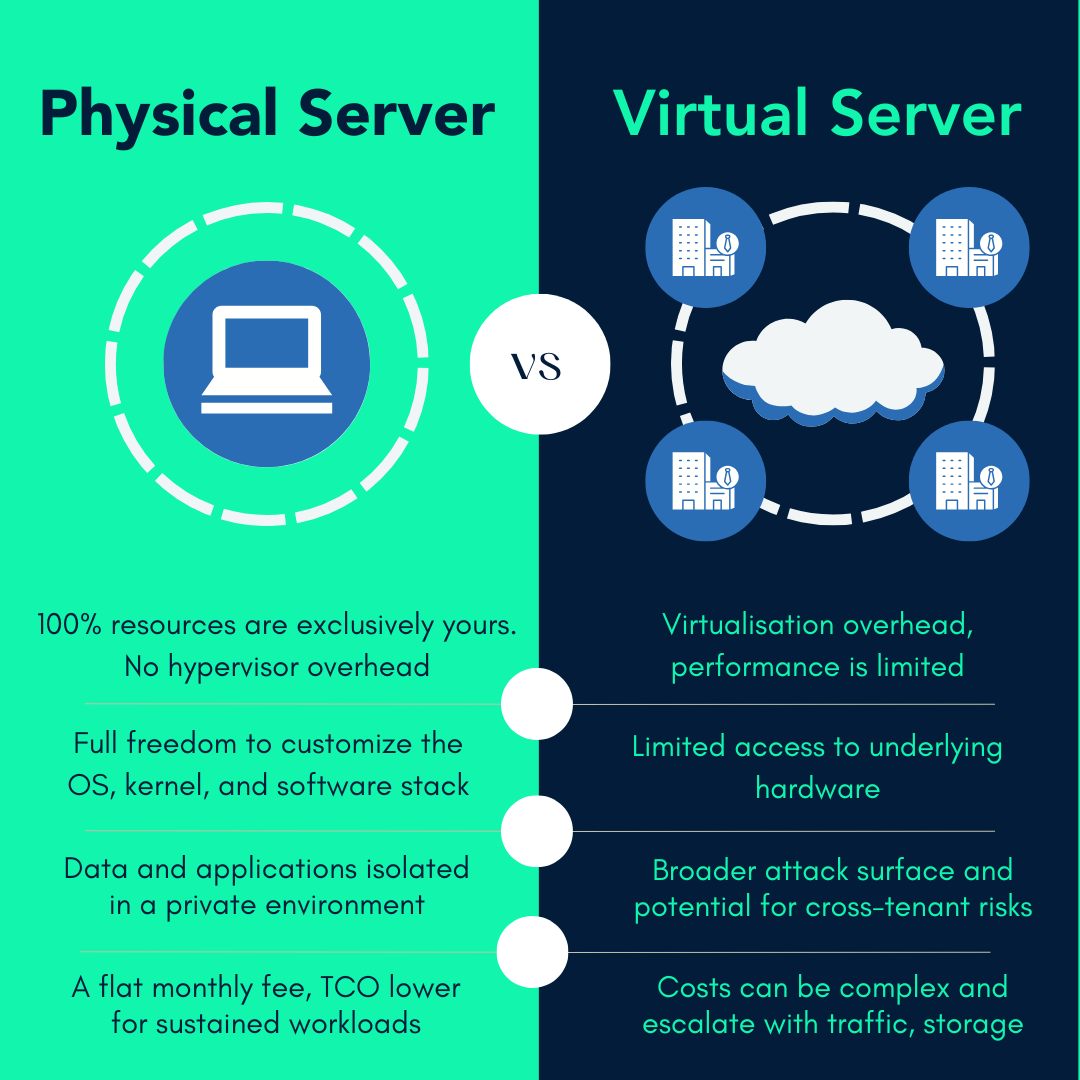
A Forex Virtual Private Server (VPS) and a Dedicated Server both provide remote hosting, but they differ fundamentally in structure and application. A VPS is a partitioned segment of a physical server, where multiple users share the hardware resources. In contrast, a dedicated server grants a single client exclusive access to an entire physical machine, including all its CPU cores, RAM, and storage. This distinction creates clear trade offs in performance, cost, and management.
For most retail traders, a dedicated server is an unnecessary expense. The performance of a quality Forex VPS is more than adequate for running one or several trading platforms. A dedicated server’s true value emerges in institutional contexts or for high frequency trading (HFT) firms that operate dozens of complex algorithms. In these scenarios, the uncontested resources and minimal latency of a dedicated machine can provide a competitive edge.
The choice often comes down to these key distinctions:
- Performance: A dedicated server offers raw, unshared power, eliminating the “noisy neighbor” effect where another user’s activity could impact your resources.
- Cost: Dedicated servers are substantially more expensive, often costing several times more than a high tier VPS plan.
- Scalability: A VPS is typically easier to scale. Upgrading RAM or CPU on a VPS can often be done with a simple reboot, while scaling a dedicated server might require physical hardware changes and longer downtime.
- Management: While both can be offered as managed services, the base responsibility for a dedicated server is far greater, covering the entire machine’s health and security.
Can You Run Multiple MetaTrader 4 Terminals on a Single VPS?
Yes, you can absolutely run multiple instances of the MetaTrader 4 (or MetaTrader 5) platform on a single VPS. This is a common practice for traders who manage several accounts, test different strategies simultaneously, or use signal copying software that requires separate platform instances. The process involves installing the MetaTrader platform into different destination folders on the server. By creating unique installation directories for each terminal, you can launch and run them as independent programs.
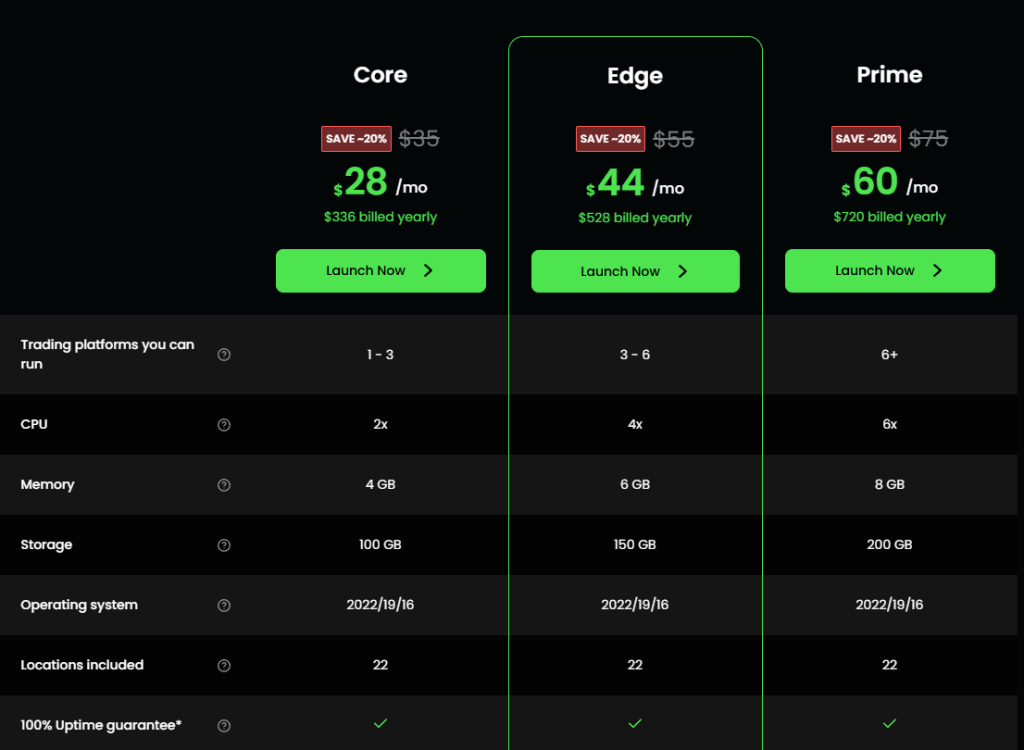
However, operating multiple terminals has direct implications for your server’s resource needs. Each instance of MT4 consumes its own portion of the server’s CPU and RAM. A basic VPS plan with 1 CPU core and 2 GB of RAM might run one or two terminals smoothly, but it would likely struggle with four or five. As you add more platforms, especially if they are running complex Expert Advisors with many charts open, the resource consumption increases accordingly.
When planning for multiple terminals, pay close attention to these resource requirements:
- RAM: This is often the first bottleneck. Each MT4 instance can use anywhere from 150 MB to over 500 MB of RAM, depending on the number of charts and indicators. You should budget at least 500 MB of RAM per terminal for stable operation.
- CPU: Multiple EAs performing complex calculations will demand more processing power. A VPS with two or more CPU cores is recommended for running three or more terminals.
- Provider Specifications: Check if your provider has any explicit limits on the number of terminals you can run, although this is uncommon. The primary limitation is almost always the hardware resources you purchase.
How does a Self-Managed VPS differ from a Fully Managed Forex VPS?
The difference between a self managed and a fully managed Forex VPS lies in the level of technical responsibility placed on you, the trader. A fully managed Forex VPS is a turnkey solution designed for convenience. The provider handles everything from the initial operating system setup and security hardening to installing the MetaTrader platform and performing ongoing maintenance and updates. You receive login credentials to a ready to use environment, allowing you to focus exclusively on trading. This service includes technical support for any hosting related issues.
A self managed VPS, sometimes called an unmanaged VPS, provides you with the basic server infrastructure and an operating system, but nothing more. You are responsible for all subsequent tasks. This includes installing the trading platform, configuring the firewall, setting up security protocols, troubleshooting software conflicts, and performing all system updates. While this option is significantly cheaper, it demands a strong technical background in server administration. Any problems that arise, from a software crash to a security breach, are your responsibility to solve.
Your technical comfort level will guide your decision between these two models:
- Fully Managed: Ideal for the vast majority of traders who lack the time or expertise for server management and prefer a plug and play experience with dedicated support.
- Self Managed: Suited for technically proficient users who want maximum control over their server environment and are comfortable handling all aspects of system administration to save on costs.
- The Trade Off: The core choice is between paying more for convenience and support (managed) or paying less for a solution that requires your own time and technical skill (self managed).
What are Common Security Risks for a Forex VPS and How Can They Be Mitigated?
A Forex VPS, being an internet connected server, is exposed to the same security risks as any other web server. Two of the most common threats are Distributed Denial of Service (DDoS) attacks and unauthorized access. A DDoS attack attempts to overwhelm your VPS with a flood of junk traffic, making it unreachable and potentially knocking your trading platform offline. Unauthorized access involves malicious actors trying to guess or steal your login credentials to gain control of your server, where they could access your trading account details or use the server for other nefarious purposes.
Mitigating these risks involves a combination of good personal habits and choosing a provider with robust security infrastructure. You are the first line of defense. The provider, in turn, should supply a secure foundation. For traders, the financial and operational integrity of their strategy depends on keeping the VPS secure from these external threats. A proactive approach to security is not optional; it is a fundamental part of a professional trading setup.
Protecting your trading environment involves a few key practices:
- Use Strong Passwords: Your Remote Desktop Protocol (RDP) password should be long, complex, and unique, combining upper and lower case letters, numbers, and symbols.
- Enable a Firewall: A properly configured firewall acts as a barrier, blocking unsolicited incoming connections and recognizing patterns of malicious traffic. Most reputable VPS providers enable this by default.
- Keep the OS Updated: Regularly install Windows Server updates. These updates frequently contain patches for newly discovered security vulnerabilities that could otherwise be exploited.
- Choose a Reputable Provider: Select a hosting company that specializes in Forex VPS. These providers often have built in DDoS mitigation and other advanced security measures to protect their entire network.
