
Research
Mastering the MT4 Magic Number: A Complete Guide to This Unique Trade ID
Dec
The MT4 Magic Number is a unique integer that an automated trading program, known as an Expert Advisor (EA), assigns to the orders it opens. This number acts as a special tag or identifier. Its main purpose is to allow an EA to distinguish its own trades from those placed manually or by other EAs running on the same account. By using this identifier, a strategy can exclusively monitor, modify, and close the positions it is responsible for, bringing order to complex automated trading environments.
Using a Magic Number is essential for preventing automated strategies from interfering with one another. When you run multiple EAs on a single account, each one is looking for trades to manage. Without a Magic Number, one EA could mistakenly close a trade opened by another, leading to chaotic and unpredictable outcomes. This simple number creates a clear boundary, so each EA only manages its own designated trades.
You implement the Magic Number in MQL4 by defining a number in your code and passing it into the `OrderSend()` function when you place a trade. This function is what EAs use to execute buy or sell orders. One of its parameters is specifically for the `magic` number. Later, you can use functions like `OrderSelect()` and `OrderMagicNumber()` to check this tag on open trades and apply your management logic.
This system of tagging and checking is the foundation of multi-strategy management in MetaTrader 4. It enables precise performance tracking by separating the results of different systems and is a fundamental concept for anyone serious about automated trading. The following sections will provide a detailed look into how this identifier works and how to use it correctly in your code.
What Is the MT4 Magic Number?
The MT4 Magic Number is a unique integer value that an Expert Advisor (EA) assigns to the trades it opens, acting as a special identifier to distinguish its orders from others. Think of it as a digital name tag that your automated strategy attaches to every trade it initiates. This tag is not generated by the broker; it is created and assigned by you, the programmer, within the EA’s code. Its existence is entirely for client-side management within the MT4 platform.
To understand this concept better, let’s break down its function and how it’s used in automated trading. An EA’s job is not just to open trades but also to manage them. This includes tasks like setting a stop-loss, moving a trailing stop, or closing the position when certain conditions are met. On a busy account with manual trades, scripts, and maybe even multiple EAs, the platform can have many open orders. The EA needs a reliable way to identify which trades belong to it. The Magic Number provides this exact solution. It serves as a filter, allowing the EA to sift through all open positions and only focus on the ones it is programmed to handle.

What is the primary function of a Magic Number in automated trading?
The primary function of a Magic Number in automated trading is to act as a filter, which allows an Expert Advisor to recognize and manage only the trades it has personally placed. This prevents the EA from interfering with manual trades or trades opened by other EAs operating on the same account. It creates a clear line of responsibility for every open position, which is fundamental for stable and predictable automated trading performance. Without this filtering mechanism, an EA would be operating blindly, unable to differentiate its own trades from any others.
Let’s see how this works in practice.
- Trade Recognition: An EA is typically programmed to periodically scan all open orders on an account. It does this by looping through each trade. For every trade in the loop, the EA calls a function to check its Magic Number. If the number matches the specific Magic Number assigned to that EA, it confirms ownership. The EA now knows, “This trade is mine, and I need to manage it according to my rules.” If the Magic Number does not match, the EA simply ignores the trade and moves on to the next one.
- Exclusive Management: Once a trade is identified as its own, the EA can apply its unique management logic. For example, a scalping EA might be designed to move its stop-loss to break-even after a 10-pip profit. By using a Magic Number, it will only apply this logic to its own scalping trades. It will not accidentally modify a long-term position opened by a different trend-following EA, which might have completely different management rules.
- Preventing Unintended Actions: The absence of a Magic Number could lead to disastrous results. Imagine two EAs trading EURUSD. EA#1 opens a buy position. A few minutes later, EA#2’s logic dictates that all EURUSD positions should be closed. Without a Magic Number to check, EA#2 would close EA#1’s position, completely disrupting its strategy. The Magic Number ensures each automated system operates within its own defined boundaries.
How does the Magic Number help in tracking the performance of different strategies?
By assigning a unique Magic Number to each distinct trading strategy or Expert Advisor, traders can accurately isolate and analyze the performance metrics for each one. This allows you to treat a single trading account as a portfolio of multiple independent systems. You can then measure the profitability, drawdown, and other key statistics of each strategy separately. This turns a jumbled account history into a set of clear, actionable reports. This method is far superior to trying to guess which trades belonged to which strategy after the fact.
Here is a more detailed look at the process.
- Strategy Segregation: A common practice for advanced traders is to run multiple strategies simultaneously. For instance, you could run a breakout strategy on GBPJPY (let’s give it Magic Number 11111) and a mean-reversion strategy on AUDCAD (Magic Number 22222) within the same account. Every trade opened by the breakout EA is tagged with 11111, and every trade from the mean-reversion EA is tagged with 22222.
- Precise Performance Analysis: When you review your account history, MT4 shows all closed trades. You can then use analysis tools or scripts to filter this history based on the Magic Number. By isolating all trades with the number 11111, you can calculate the exact net profit, win rate, and profit factor for your breakout strategy. You can do the same for Magic Number 22222 to evaluate your mean-reversion strategy. This separation is clean and removes any ambiguity.
- Informed Decision-Making: This segregated data empowers you to make better trading decisions. Perhaps you discover that your breakout strategy has been consistently profitable, while the mean-reversion strategy is in a drawdown. With this clear information, you can choose to increase the risk on the successful strategy or pause the underperforming one for optimization. Without Magic Numbers, all the results would be blended together, making it difficult to identify the true source of profits or losses.
Why Is Using a Magic Number Crucial in MT4?
Using a Magic Number in MT4 is essential because it provides order management control, prevents conflicts between different automated strategies, and allows for precise performance tracking of each system. It is the cornerstone of running a sophisticated, multi-strategy trading operation on a single account. Without it, you would face a high risk of EAs interfering with each other, leading to unpredictable and often negative results. The Magic Number brings structure and logic to an otherwise chaotic environment.
To see why this simple integer is so important, let’s explore the specific problems it solves and how it differs from other identifiers. When an EA is active, it continuously scans the trading environment to make decisions. Part of this process involves looking at currently open trades. If you run more than one EA, or if you trade manually alongside an EA, each program needs a way to know what it is responsible for. The Magic Number is the standard MQL4 solution for this challenge. It allows a piece of code to say, “I will only touch trades that have my specific ID number.” This simple rule is what makes stable automated trading possible.
Does the Magic Number prevent different Expert Advisors from conflicting with each other?
Yes, the Magic Number is the primary mechanism that prevents different Expert Advisors from conflicting with each other when running on the same trading account. It acts as a digital fence between strategies. Each EA is programmed with its own unique Magic Number, and it is instructed to only manage trades that bear that specific number. This simple but powerful rule stops one automated system from accidentally modifying or closing the trades of another.

Let’s illustrate with a clear example.
- A Scenario Without Magic Numbers: Imagine you have two EAs. EA-Trend follows long-term trends and might hold a trade for days. EA-Scalp looks for very small, quick profits and might close a trade within minutes. Both are running on the EURUSD pair. EA-Trend opens a buy order, expecting the price to rise over the next week. A few minutes later, EA-Scalp identifies a small downward move and its logic tells it to “close all open EURUSD positions.” Without a Magic Number check, EA-Scalp would immediately close EA-Trend’s long-term buy order, completely destroying its strategy.
- The Solution with Magic Numbers: Now, let’s assign EA-Trend the Magic Number 1001 and EA-Scalp the Magic Number 2002. When EA-Trend opens its buy order, it tags it with 1001. When EA-Scalp runs its code to close positions, it first checks the Magic Number of each open trade. It will see the buy order, check its Magic Number, find that it is 1001 (not 2002), and correctly ignore it. It will only interact with trades it opened itself, which are tagged with 2002.
- Maintaining Strategic Integrity: This separation ensures the integrity of each strategy. The long-term system can execute its plan without interruption from the short-term system. This principle also extends to trades placed by scripts or even manual trades. Manual trades have a Magic Number of 0 by default. A well-programmed EA will check for its own Magic Number and will not interfere with trades that have a Magic Number of 0, preserving your manually opened positions.
How does the Magic Number differ from the Order Ticket ID?
The key difference is that the Order Ticket ID is a unique serial number assigned by the broker’s server for every transaction, while the Magic Number is a user-defined identifier assigned by the client’s EA for internal management purposes. The Order Ticket is an official, unchangeable reference for a trade. The Magic Number is a private, flexible label used by your trading software to organize its operations. You can think of the Order Ticket as a government-issued ID number and the Magic Number as the name of the team a player belongs to.

Let’s compare their attributes directly to make the distinction clear.
- Origin and Control:
– Order Ticket ID: This number is generated and assigned exclusively by the broker’s trading server the moment an order is executed. The user and the EA have zero control over this number. It is returned by the server as confirmation of a successful order placement.
– Magic Number: This number is defined and assigned by the user or programmer on the client side (within your MT4 terminal). You choose the number and pass it as a parameter when your EA places a trade. It is completely for your own organizational use.
- Purpose and Use Case:
– Order Ticket ID: Its main purpose is for official record-keeping and tracking at the broker level. If you ever need to discuss a specific trade with your broker’s support team, you will refer to its Ticket ID. It is the definitive reference for that single transaction.
– Magic Number: Its main purpose is to enable an EA to filter and manage groups of trades that belong to a single strategy. An EA can use it to find all its open positions and apply logic to them collectively or individually.
- Uniqueness:
– Order Ticket ID: Each Order Ticket ID is absolutely unique for every single order. No two trades on the broker’s server will ever share the same Ticket ID.
– Magic Number: A Magic Number is not unique per trade; it is unique per strategy. An EA using Magic Number 5555 might open ten different trades on various currency pairs. All ten of those trades will share the same Magic Number of 5555. This is how the EA knows they all belong to the same “family” of trades.
How Do You Implement and Use the Magic Number in MQL4?
To implement a Magic Number in MQL4, you define an integer variable for it and then pass that variable into the `magic` parameter of the `OrderSend()` function when placing a trade. This action effectively “tags” the trade with your chosen number. Afterwards, you use a loop and a combination of the `OrderSelect()` and `OrderMagicNumber()` functions to identify and manage only the trades that carry your specific tag. This two-part process of assigning and checking is central to building a robust Expert Advisor.
Let’s walk through the practical code steps for assigning and then checking this number in your Expert Advisor. The process is straightforward and is a fundamental skill for any MQL4 programmer. By mastering this, you gain precise control over your automated strategies, allowing them to function correctly in any account environment. The following sections provide code examples and explain the key functions involved, giving you the tools needed to implement this feature in your own EAs.
What are the steps to assign a Magic Number when placing an order?
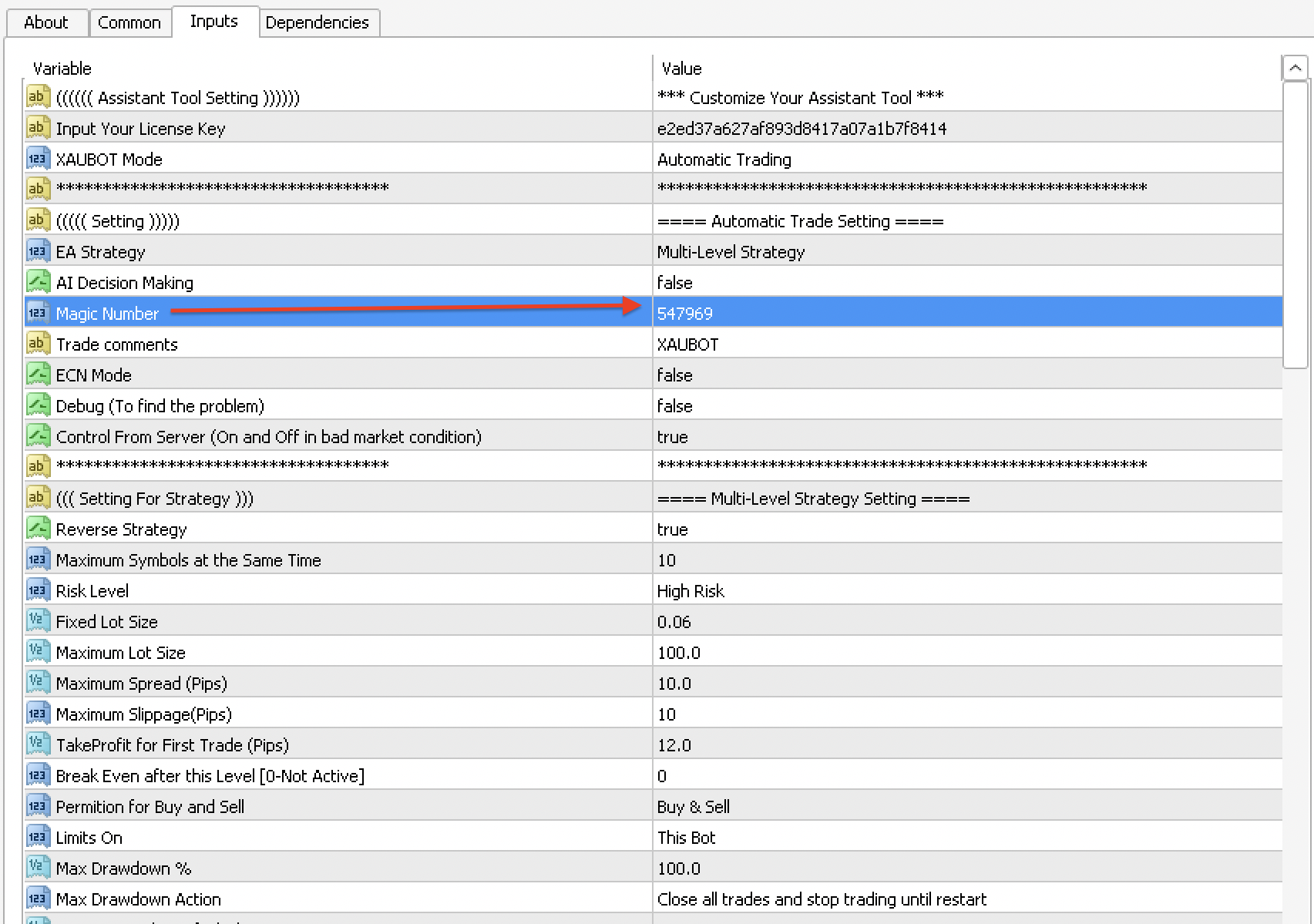
To assign a Magic Number, you first declare an integer variable to hold your chosen number, and then you pass this variable as the ninth parameter in the `OrderSend()` function call. This process embeds your identifier into the order data right at the moment of its creation. Making this variable an external input is a common best practice, as it allows you to easily change the Magic Number from the EA’s settings without needing to recompile the code.
Here is a step-by-step guide with code snippets.
1. Declare the Magic Number Variable: At the top of your EA’s code, where you declare other global variables and inputs, add a line for your Magic Number. Using `extern` (or `input` in newer MQL4) makes it a user-configurable setting.
“`mql4
// EA Inputs
extern int MyMagicNumber = 54321;
“`
In this example, we have created an input named `MyMagicNumber` and given it a default value of `54321`. When you attach the EA to a chart, you will see this as a parameter you can change.
2. Use it in the `OrderSend()` Function: When your EA’s logic determines it is time to open a trade, you will call the `OrderSend()` function. You must place your variable, `MyMagicNumber`, in the correct parameter slot. It is the ninth parameter.
“`mql4
// Inside a function that opens a trade
int ticket;
ticket = OrderSend(
Symbol(), // Symbol for the trade
OP_BUY, // Buy order
0.1, // Lot size of 0.1
Ask, // Opening price
2, // Slippage
0, // Stop loss (set later)
0, // Take profit (set later)
“My First EA”, // Order comment
MyMagicNumber, // <<– THE MAGIC NUMBER IS ASSIGNED HERE
0, // Order expiration (for pending orders)
clrNONE // Color of the arrow on the chart
);
“`
Once this code executes successfully, a buy order will be opened on the chart, and it will be internally tagged with the number `54321`. Your EA can now identify this trade as its own.
What are the common MQL4 functions used to check an order’s Magic Number?
The most common functions for checking an order’s Magic Number are `OrderSelect()`, which selects a specific trade to examine, and `OrderMagicNumber()`, which retrieves the Magic Number of the selected trade. These functions are almost always used together inside a `for` loop that iterates through all the open positions in the trade pool. This loop structure allows your EA to systematically check every trade one by one and find the ones it needs to manage.
Here is a breakdown of the functions and a code example showing how they work together.
- The Core Functions:
– `OrdersTotal()`: This function returns the current number of open and pending orders. It is used to set the boundaries for your loop.
– `OrderSelect(index, SELECT_BY_POS, MODE_TRADES)`: This is the workhorse function. It selects a single trade from the pool based on its position (`index`). Once a trade is successfully selected, other functions can be used to get its properties, like its Magic Number or symbol.
– `OrderMagicNumber()`: After `OrderSelect()` returns `true`, you call this function. It returns the integer Magic Number of the trade that is currently selected.
- The Filtering Logic in Code:
The following code shows a complete function that loops through all open trades and closes only the ones that belong to the EA.
“`mql4
// Global variable declared at the top of the file
extern int MyMagicNumber = 54321;
// A function to manage or close trades
void ManageTrades()
{
// Loop backwards through all trades. This is safer when closing orders.
for (int i = OrdersTotal() – 1; i >= 0; i–)
{
// Select an order from the trade pool
if (OrderSelect(i, SELECT_BY_POS, MODE_TRADES))
{
// Check if the selected order’s Magic Number matches our EA’s number
if (OrderMagicNumber() == MyMagicNumber)
{
// It’s our trade! Now we can apply management logic.
// For example, let’s check if we should close it.
// bool closeCondition = true; // (Your logic here)
// if (closeCondition)
// {
// OrderClose(OrderTicket(), OrderLots(), MarketInfo(OrderSymbol(), MODE_BID), 2, clrRed);
// }
}
}
}
}
“`
In this example, the code first selects a trade using `OrderSelect()`. It then immediately checks if `OrderMagicNumber()` returns a value equal to `MyMagicNumber`. Only if there is a match does the code proceed into the inner block where trade management logic, such as closing the order, would be placed. This structure is the fundamental way to filter and manage trades in MQL4.
What Are the Advanced Strategies and Common Issues with Magic Numbers?
Advanced strategies for Magic Numbers focus on systematic organization and error prevention, while common issues often stem from coding oversights and misunderstandings of how platforms handle trade identification. Beyond simply assigning a number, a well-planned approach involves creating scalable systems for multiple Expert Advisors (EAs) and troubleshooting frequent errors that can disrupt automated trading. Furthermore, recognizing the differences in trade identification between platforms like MT4 and MT5 is essential for developers working in both environments. These advanced considerations help traders build more robust and reliable automated systems.
What is the default Magic Number for manual trades and can it be modified?
The default Magic Number for all manual trades is zero (0), and this value is fixed and cannot be changed by the user. This design is a core feature of the MetaTrader 4 platform, creating a clear separation between human intervention and automated actions. When you manually open or close a trade, the platform automatically assigns it the Magic Number 0. Why is this distinction so important for automated trading? It prevents an Expert Advisor from accidentally interfering with trades you have placed yourself.
An EA is programmed to identify and manage trades based on the unique Magic Number it was assigned. If an EA were also to use the number 0, it would be unable to distinguish between its own automated orders and your manual ones. This could lead to serious problems. For instance, the EA might close a manual trade prematurely, apply a trailing stop where you did not want one, or miscalculate its profit and loss based on trades it did not actually open. To maintain control and logical separation, developers should always use a non-zero, unique integer for each automated strategy. This practice creates a clean operational boundary.
- Immutable Value: The zero value for manual trades is hardwired into the MT4 terminal and cannot be altered through settings or code.
- Conflict Avoidance: Using a non-zero Magic Number is the primary method for an EA to manage its own operations without disrupting other EAs or manual trading activities on the same account.
- EA Logic: All trade management functions within an EA, such as `OrderSelect()` loops for modifying or closing positions, must include a check to confirm the `OrderMagicNumber()` matches the EA’s assigned number.
What are some best practices for organizing Magic Numbers across multiple EAs?
A structured system for organizing Magic Numbers prevents conflicts when you run multiple EAs or strategies on a single account. A disorganized approach, where numbers are chosen randomly, can lead to two EAs using the same identifier, causing them to interfere with each other’s trades. Let’s see a few effective methods for keeping your Magic Numbers organized and unique. One popular technique is to allocate blocks of numbers to different EAs. This creates clear, separated ranges for each strategy.
This method enhances clarity and simplifies debugging. For example, you can immediately identify which EA placed a trade just by looking at its Magic Number. A well-documented system is the key to managing this successfully, especially as you add more strategies. What other approaches can you use?
- Numerical Range Allocation: Assign a specific range of numbers to each Expert Advisor. For instance, EA #1 could use numbers from 10000 to 19999, while EA #2 uses 20000 to 29999. This makes it easy to identify the source of any trade.
- Structured Naming Convention: Create a system based on the strategy’s properties. An EA trading EURUSD on the H1 timeframe could use a number like 101060 (1 for EA ID, 01 for EURUSD, 60 for the timeframe).
- Date Based System: Use the date of deployment as a base for the Magic Number, such as 20241025. While this guarantees uniqueness, it can be less intuitive for quickly identifying the strategy behind the trade compared to a block allocation system.
What are the most common coding errors related to the Magic Number?
The most frequent coding mistakes involving Magic Numbers typically arise from simple oversights that can have major consequences for a trading account. One of the most damaging errors is forgetting to include a Magic Number check inside a trade management loop. A developer might write a piece of code designed to close all open positions for a specific strategy. If this code iterates through every open order but fails to check if `OrderMagicNumber()` matches the EA’s unique ID, it will close every single trade on the account, including those from other EAs and manual trades.

Another common pitfall is reusing the same Magic Number across two different, conflicting strategies. For example, if a scalping EA and a long term trend following EA both use the number 5555, they will interfere with each other. The scalping bot might close a position that the trend bot intended to hold for weeks. You’ll notice this is particularly problematic when running two instances of the same EA with different input settings. A third mistake is hardcoding the Magic Number directly into the MQL4 source file instead of using an external input parameter.
- Hardcoding the Value: Writing the number directly in the code (e.g., `int magic = 12345;`) prevents users from easily changing it. Instead, use an input variable (`input int MagicNumber = 12345;`) so it can be modified from the EA’s settings panel.
- Incorrect Variable Scope: Declaring the Magic Number locally within a function instead of globally can lead to it being reset or inaccessible to other parts of the EA’s code.
- Ignoring Return Values: Failing to check if a trade was successfully placed before assuming an order with that Magic Number exists, which can lead to logical errors in trade management.
How does the Magic Number in MT4 compare to the trade identification system in MT5?
The Magic Number concept in MT4 is similar in purpose to the `DEAL_MAGIC` and `POSITION_MAGIC` properties in MT5, but their implementation differs due to MT5’s separate accounting systems. Both platforms use these identifiers to help automated strategies distinguish their own trades from manual ones or those of other EAs. In MT4, the system is straightforward: every order placed has a ticket number and an associated Magic Number, which can be retrieved with the `OrderMagicNumber()` function. This works perfectly within MT4’s “hedging” model, where multiple open trades on the same symbol are treated as distinct orders.
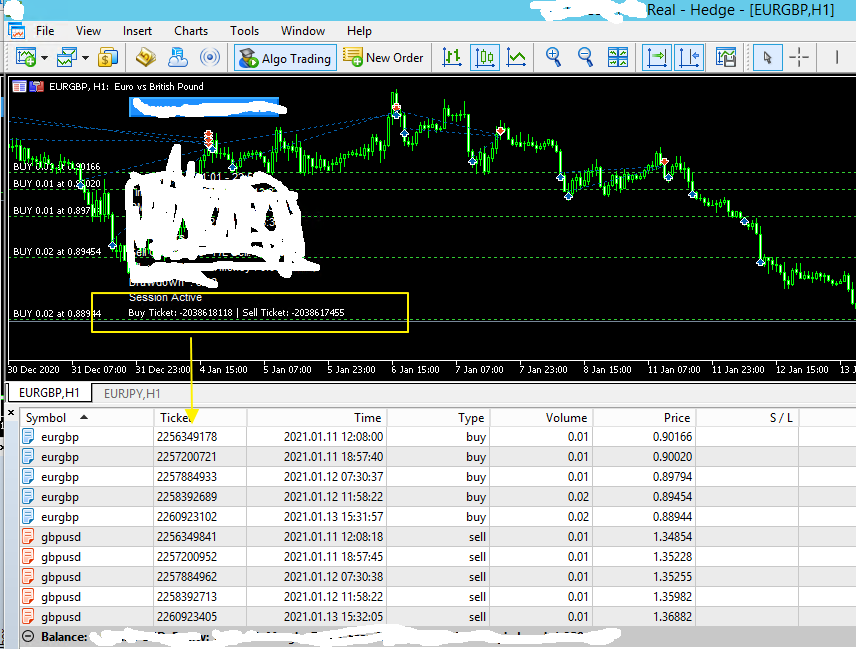
MetaTrader 5 introduces a more layered structure with two account types: hedging and netting. In an MT5 hedging account, the system works much like MT4, where each position has a `POSITION_MAGIC` property. However, the netting system is different. In a netting account, all trades for a single symbol are aggregated into one net position. You cannot have a long and a short position open simultaneously on EURUSD. Here, the identifier applies to individual deals. Each transaction that contributes to the net position is a “deal,” and it carries a `DEAL_MAGIC` identifier. An EA must therefore track deals to understand its contribution to the overall position.
- MT4 Simplicity: Uses a single function, `OrderMagicNumber()`, to identify orders in its standard hedging environment.
- MT5 Complexity: Differentiates between orders, deals, and positions. Programmers must use functions like `PositionGetInteger(POSITION_MAGIC)` for hedging accounts or `HistoryDealGetInteger(DEAL_MAGIC)` to track activity in netting accounts.
- Core Functionality: Despite the different implementation details and terminology, the fundamental goal remains the same across both platforms: to provide a reliable mechanism for automated strategies to manage their specific operations without conflict.
