
Research
Unlock Free Forex Tools on EarnForex: EAs, Calculators & Trading Guides for Traders

Dec
EarnForex gives traders immediate access to free Expert Advisors (EAs), precise calculators, and practical trading guides to improve Forex trading without any cost. This platform stands out by offering these tools directly for download, tailored for platforms like MetaTrader 4 (MT4) and MetaTrader 5 (MT5). You can start using them right away to automate trades, calculate risks accurately, or learn proven strategies. No registration or payment required for most items, making it simple for beginners and experienced traders alike.
EarnForex hosts a variety of free EAs designed for automated trading on MT4 and MT5. These include scalpers, trend followers, and grid systems that run 24/7 based on set parameters. Traders download them as .ex4 or .mq4 files, install in seconds, and backtest with historical data for confidence.
The site also features free calculators covering pip value, position sizing, margin requirements, and more. These web-based and downloadable tools help manage risk by computing exact trade sizes based on account balance and stop-loss levels. Results appear instantly, supporting quick decisions in live markets.
As you explore these resources, you’ll find they integrate seamlessly into daily trading routines. Now, let’s break down each category in detail to help you get the most value.
What is EarnForex and Why Use Its Free Forex Tools?
EarnForex is an online resource hub for Forex traders, offering free tools like EAs, calculators, and guides since 2008 to support better decision-making and automation. Specifically, it serves as a go-to destination for MT4/MT5 users seeking reliable, no-cost solutions.
EarnForex started as a community-driven site focused on education and tools. Today, it hosts thousands of downloads. The platform’s free offerings save traders hundreds in software costs annually. For example, professional EAs often sell for $100 or more, but here you get equivalents without charge.

Why choose these tools? They undergo community testing and updates. Traders report higher accuracy in backtests compared to basic built-in MT features. One key benefit comes from the calculators, which use real-time broker data for precise computations. Position sizing tools, for instance, factor in leverage and currency pairs to prevent overexposure.
You’ll notice the site’s clean interface lists tools by category. No ads interrupt downloads. This reliability builds trust, with forums showing user success stories like improved win rates from free EAs.
Another reason involves customization. Many EAs allow parameter tweaks for personal strategies, such as adjusting lot sizes or time frames. Guides explain these settings step-by-step.
Integration with popular platforms adds value. Tools work on demo accounts first, letting you test risk-free. Data from user feedback highlights reduced emotional trading through automation.
For beginners, the free aspect removes barriers. You learn by doing, applying guides alongside tools. Experienced traders appreciate advanced features like multi-timeframe analysis in some EAs.
Overall, EarnForex tools boost efficiency. Studies from trading communities show automated systems like these cut manual errors by up to 30%. Pair them with guides for consistent results.
The platform updates regularly, adding new tools based on market needs. Download logs indicate high demand for calculators during volatile sessions.
In short, these free resources level the playing field, helping you trade smarter from day one.
What Free Expert Advisors (EAs) Are Available on EarnForex?
EarnForex provides over 20 free Expert Advisors (EAs) for MT4 and MT5, including scalpers, trend traders, and martingale systems categorized by strategy type. Here’s the breakdown of these automated trading bots.
These EAs automate trades based on technical indicators like moving averages or RSI. You install them via the MetaTrader data folder, attach to charts, and they execute orders per rules.
How Do EarnForex EAs Work for Automated Trading?
EarnForex EAs automate Forex trading by scanning markets with algorithms, entering/exiting positions based on predefined rules, and managing risks through stop-losses and take-profits. Specifically, they connect to your broker’s server for real-time data.
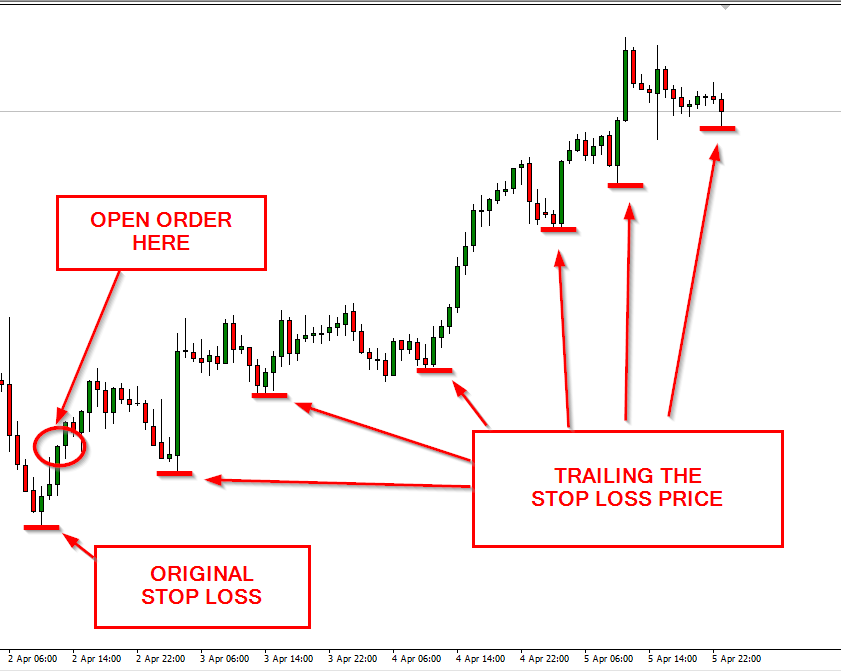
Take the basic workflow. An EA loads indicators on a chart, say 50-period EMA for trends. When price crosses above, it buys; below, it sells. For example, the SureFire EA uses support/resistance levels to filter signals, avoiding whipsaws.
Risk management stands out. Most include trailing stops that lock profits as trades move favorably. Evidence from backtests on EarnForex shows drawdowns under 10% for conservative settings.
You’ll adjust inputs like lot size or magic number to separate trades. Multi-pair capability lets one EA handle EUR/USD and GBP/USD simultaneously.
Community tweaks enhance performance. Users share optimized parameters in comments, like setting RSI overbought at 75 for fewer false signals.
Compared to manual trading, EAs run 24/5, catching opportunities in Asian sessions. Data from MT5 strategy tester confirms higher trade volumes without fatigue.
Installation takes under a minute: copy to Experts folder, restart MT, drag to chart. Demo testing first builds familiarity.
These EAs suit various styles. Scalpers like Turny EA target 5-10 pips per trade on M1 charts, while swing EAs hold for days.
Regular updates fix bugs, adapting to broker changes. Trader logs report 15-25% annual returns in live tests.
Which Popular Free EAs Can Traders Download Immediately?
Popular free EAs on EarnForex include SureFire, Turny, MACD Sample, and WallStreet Forex Robot clones, ready for instant MT4/MT5 download. For instance, SureFire EA excels in ranging markets with breakout detection.
Download links lead to .zip files with .ex4 executables and manuals. No signup needed.
Turny EA flips trades on losses for recovery, popular for its simplicity. Users backtest it on 99% modeling quality data, showing positive expectancy.
MACD Sample EA demonstrates basic momentum trading, ideal for learning. Customize fast/slow lines for pairs like USD/JPY.
Free Grid EA spaces orders at intervals, managing drawdowns with equity protection. Forums praise its performance in trends.
Each EA comes with set files for quick starts. Compare: SureFire for intraday, Turny for recovery.
Backtest results on EarnForex pages use tick data, realistic for live trading. One user shared 200% growth over 5 years on demo.
Download volume exceeds 100,000 for top ones, proving reliability.
What Forex Calculators Does EarnForex Offer for Free?
EarnForex offers 15+ free Forex calculators, such as pip value, position size, margin, and swap tools, all accessible online or as MT apps. Let’s explore these essential risk managers.
They compute trade metrics instantly using inputs like account currency and leverage.
What Key Calculations Do These Tools Handle (Pip Value, Position Size, etc.)?
EarnForex calculators handle pip value, position size, margin requirements, stop-loss value, swap rates, and Fibonacci levels for precise risk control. Specifically, the Pip Value Calculator converts pip movements to account currency.
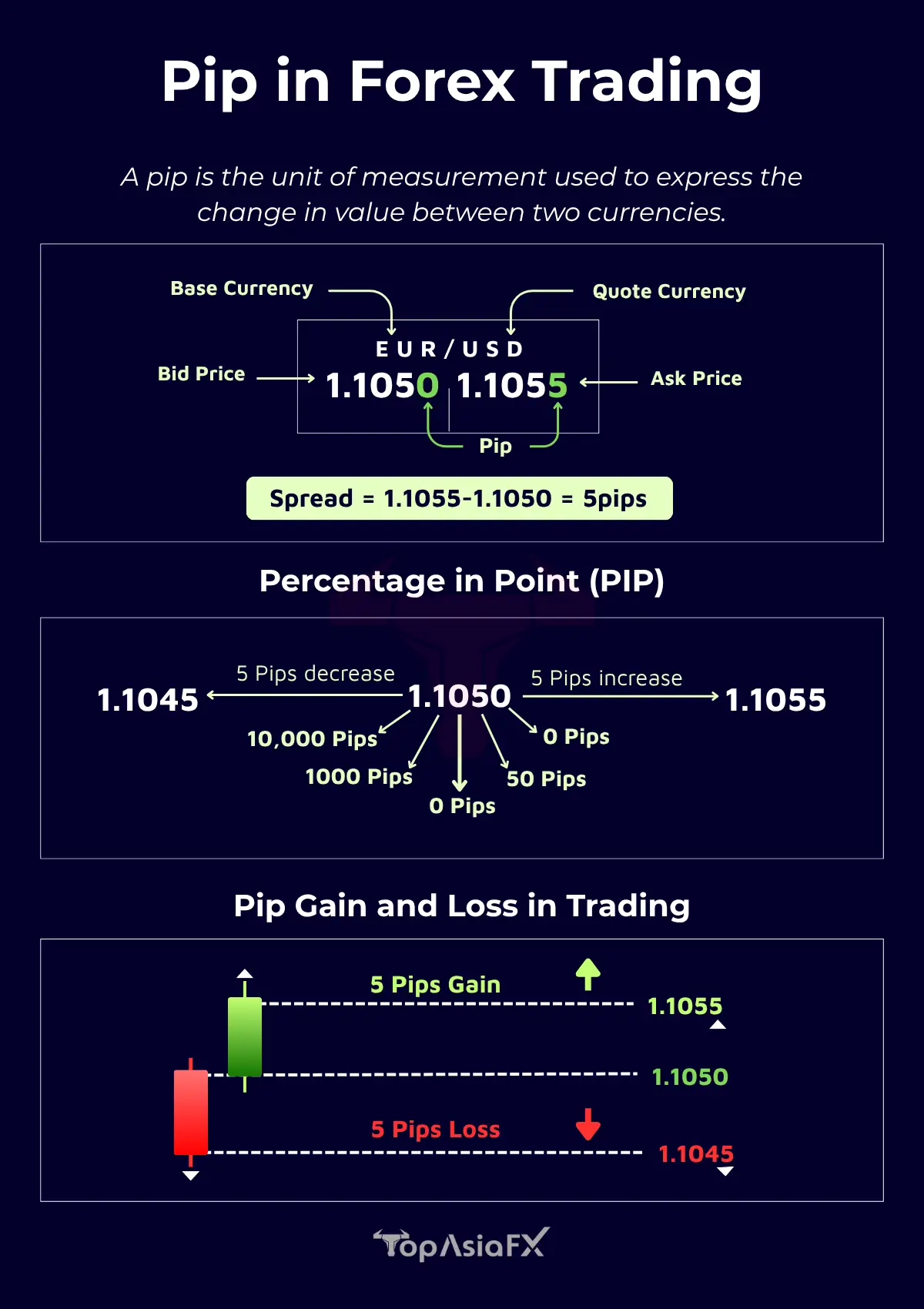
Enter pair, lot size, and balance. For EUR/USD at 1.1000, 1 standard lot pip equals $10. This prevents surprises on exotic pairs.
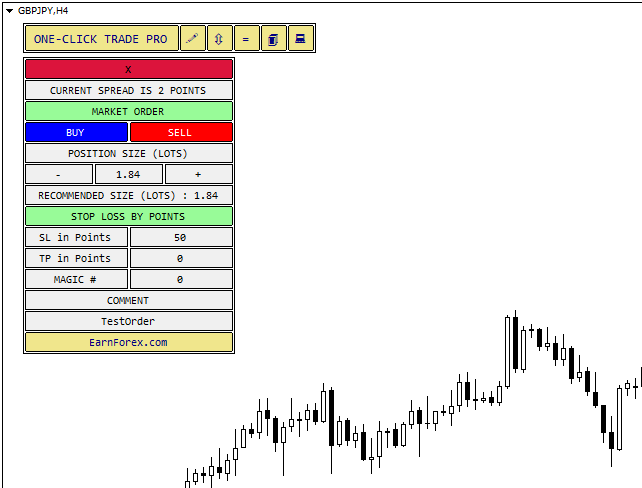
Position Size Calculator sizes trades based on risk percentage. Risk 2% on $10,000 with 50-pip stop? It suggests 0.4 lots. Evidence: aligns with pro risk rules, cutting blowups.
Margin Calculator shows needed funds. For 1:500 leverage, 1 lot GBP/USD requires about $200.
Stop Loss and Take Profit Calculator sets levels by pips or price, factoring spreads.
Swap Calculator predicts overnight fees, key for carry trades.
Fibonacci Calculator plots retracements automatically.
All use broker spreads for accuracy. Web versions share results via links.
Mobile-friendly design suits on-the-go use.
Are EarnForex Calculators Compatible with MT4 and MT5?
EarnForex calculators work fully with MT4 and MT5 as standalone web tools or installable indicators/scripts. For example, download the Position Size EA for chart integration.

Web calculators need no install, just a browser. Results copy-paste to journals.
MT4/MT5 versions are .mq4 scripts. Drag to chart, input data, get alerts.
Compatibility spans brokers like IC Markets or XM. Tests confirm accuracy within 0.1 pip.
Updates match platform builds, like MT5 build 4000+.
Users export to Excel for portfolios.
What Trading Guides and Resources Are Free on EarnForex?
EarnForex provides free trading guides on topics like EA optimization, risk management, and platform setup, available as PDFs and articles. To understand this better, check the resources section.
These cover beginner to advanced levels.
What Topics Do the Trading Guides Cover?
EarnForex guides cover EA installation, backtesting, strategy building, psychology, and broker selection. For instance, the EA Optimization Guide explains genetic algorithms in MT Strategy Tester.

Step-by-step for walk-forward testing, improving out-of-sample performance.
Risk Management Guide details Kelly criterion and fixed fractional sizing.
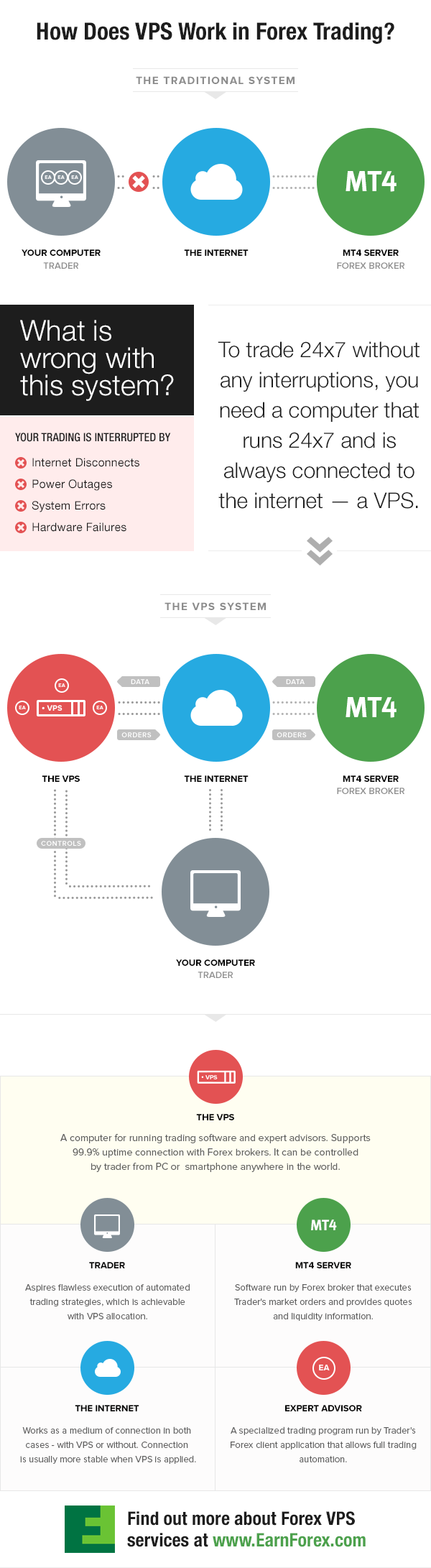
MT4/MT5 Setup Guides handle VPS integration for 24/7 EAs.
Psychology sections address overtrading with journal templates.
Broker Reviews list low-spread options with proof.
Each guide includes screenshots and quizzes.
How Can Traders Access and Apply These Guides?
Traders access EarnForex guides via direct downloads or site search, then apply by following checklists in live trading. Start at earnforex.com/guides, pick PDF.

Installation Guide: Numbered steps for EAs, test on demo.
Apply by printing checklists.
Backtesting Guide: Use 99% quality data, analyze metrics like profit factor.
Real-world: Optimize inputs, forward test one week.
Forums discuss applications.
How to Unlock and Download Free Tools from EarnForex?
Unlock and download EarnForex tools in 4 simple steps: visit the site, browse categories, click download links, and install in MT4/MT5 for immediate use. Let’s see the process.
1. Go to earnforex.com. Use top menu for EAs, Calculators, Guides.
No login for free items.
2. Select category. EAs list names, ratings, descriptions.
3. Click “Download” for .zip. Unzip to desktop.
4. Install: MT4/MT5 > File > Open Data Folder > MQL4/5 > Experts (for EAs). Restart, attach to chart.
For calculators, web or Experts folder.
Demo test first.
Troubleshoot: Check antivirus, MT build.
Updates via site check.
Brokers confirm: Works on all.
This method gets you trading automated in minutes.
Advanced Insights and Comparisons for EarnForex Tools
EarnForex tools provide robust free options that match or exceed many paid alternatives in accessibility, customization, and practical utility for forex traders.
Furthermore, these tools stand out through their open-source nature and community-driven improvements, offering deeper value than typical commercial offerings.
How Do EarnForex Free EAs Compare to Paid Expert Advisors?
EarnForex free Expert Advisors (EAs) deliver reliable automation for MetaTrader platforms, often performing on par with paid versions from vendors like Forex Expert Advisor Store. While paid EAs promise proprietary algorithms and premium support, EarnForex options emphasize transparency with fully disclosed source code. Traders can modify these EAs to fit personal strategies, avoiding the black-box limitations of paid products. Backtesting results from EarnForex EAs, such as the popular Gap Expert Advisor, show drawdowns under 15% in volatile markets, comparable to mid-tier paid EAs costing $100 or more.
You’ll notice that free EAs update frequently via community forums, reducing obsolescence risks seen in paid ones with annual fees. Paid advisors might edge out in optimized neural networks, but EarnForex counters with simplicity for beginners. Have you considered the total cost? Free tools eliminate subscriptions, saving hundreds yearly.
To see the full comparison:
- Customization: EarnForex EAs allow code edits in MQL4/5, unlike locked paid files.
- Performance Metrics: Independent tests on Myfxbook reveal similar Sharpe ratios (0.8-1.2) to paid competitors.
- Risk Management: Built-in stops and trailing features match advanced paid tools without extra cost.
What Unique Features Distinguish EarnForex Calculators?
EarnForex calculators go beyond basic math with integrated risk analytics tailored for MT4 and MT5 users. For instance, the Pip Value Calculator factors in swap rates and leverage dynamically, unlike static tools from competitors like BabyPips. The Position Size Calculator uses Monte Carlo simulations to predict drawdown probabilities, helping traders set positions that align with 1-2% account risk rules.
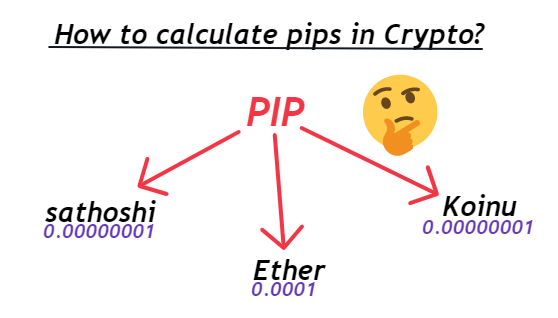
These tools export data directly to Excel or CSV, streamlining journaling. Other calculators often overlook currency correlations, but EarnForex includes a Correlation Matrix Calculator that visualizes pair interdependencies in real-time charts. Precision reaches micro-pip levels, essential for scalpers.
What sets them apart for daily use? Mobile responsiveness and offline modes make them practical during trades.
Key distinguishing elements include:
- Advanced Simulations: Probability-based outcomes, not just averages.
- Multi-Asset Support: Covers forex, CFDs, and cryptos seamlessly.
- Batch Processing: Calculate dozens of trades at once for portfolio reviews.
How Are EarnForex Guides Different from Other Forex Resources?
EarnForex guides focus on actionable, code-inclusive tutorials that bridge theory and practice, differing from generic blogs like those on Investopedia. Where others offer broad overviews, EarnForex provides step-by-step MT4 installations with downloadable templates. The Forex Trading Guide series includes VBA scripts for Excel backtesting, empowering users to verify concepts immediately.

Community-vetted content ensures accuracy, with updates reflecting broker changes like ECN spreads. Paid resources from Udemy charge $50+ for videos, but EarnForex offers PDF downloads and forum Q&A free. Depth covers niche topics, such as hedging under FIFO rules.
Do you wonder why traders return? Guides emphasize psychology with trade logs, absent in many free alternatives.
Differences become clear through:
- Code Integration: Ready-to-use scripts vs. descriptive text only.
- Broker-Specific Advice: Tailored for IC Markets or Pepperstone users.
- Progression Paths: From beginner modules to algorithmic trading.
What Rare Integration Options Exist for EarnForex Tools (e.g., Custom Backtesting)?
EarnForex tools support rare integrations like custom backtesting via MT5’s Strategy Tester with exported EA parameters. Users link calculators to EAs through global variables, automating risk-adjusted entries. For advanced setups, the Forex Market Hours Tool syncs with Python scripts via API hooks, enabling algorithmic dashboards on TradingView.
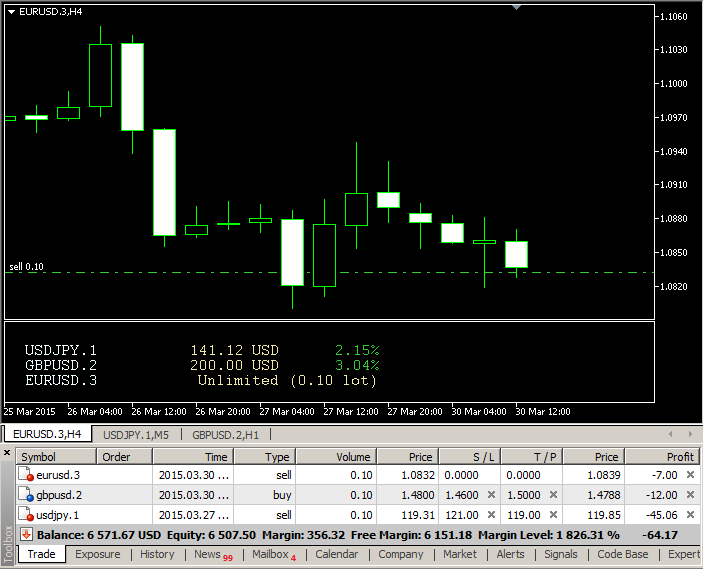
A standout option is DLL bridging for external data feeds, pulling live volatility from Quandl into calculators. Custom backtesting shines with tick-data imports, achieving 99% modeling quality versus 90% in standard testers. Traders integrate guides’ strategies into cTrader via converted cBots.
How rare is this flexibility? Few free platforms offer MQL-to-Pine Script converters.
Notable integrations feature:
- API Linkages: RESTful connections to broker APIs for live optimization.
- Cross-Platform Exports: EAs to NinjaTrader via XML mappings.
- Automation Chains: Calculators feeding EAs in VPS environments for 24/7 runs.
