
Research
Download MetaTrader 4 (MT4) Free: Forex Trading Platform for PC, Android, iOS & Mac

Dec
MetaTrader 4 (MT4) is free to download across PC, Android, iOS, and Mac platforms from the official MetaQuotes website or trusted forex brokers. This popular forex trading software lets you access real-time market data, advanced charts, and automated trading tools without any upfront cost. You simply need to pick your device, follow a quick download process, and connect to a broker’s server for demo or live trading. Millions of traders worldwide use MT4 because it offers a reliable way to analyze currency pairs, place orders, and test strategies on the go.
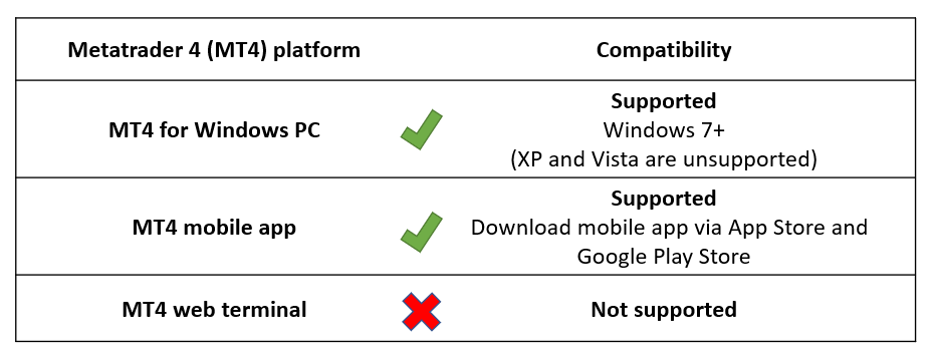
MT4 works on Windows, Mac, Android, and iOS with minimal system needs that most modern devices meet. You can run the desktop version on older Windows like XP or newer, while mobile apps require basic OS versions such as Android 4.0 or iOS 9.0. This broad compatibility means you start trading forex from almost any gadget without hardware upgrades.
After downloading, setting up a demo account takes just minutes to practice risk-free. Brokers provide virtual funds through MT4, so you explore features like Expert Advisors (EAs) and technical indicators before using real money. This step builds confidence in your forex approach.
Now that you know the basics, let’s break down everything from what MT4 offers to step-by-step installation guides. You’ll find detailed sections ahead to get you trading smoothly.
What is MetaTrader 4 (MT4)?
MetaTrader 4 (MT4) is a free forex trading platform developed by MetaQuotes Software in 2005, featuring advanced charting tools, automated trading via Expert Advisors (EAs), and real-time quotes for currency pairs. Specifically, this section covers its core definition and standout attributes that make it a go-to for traders.
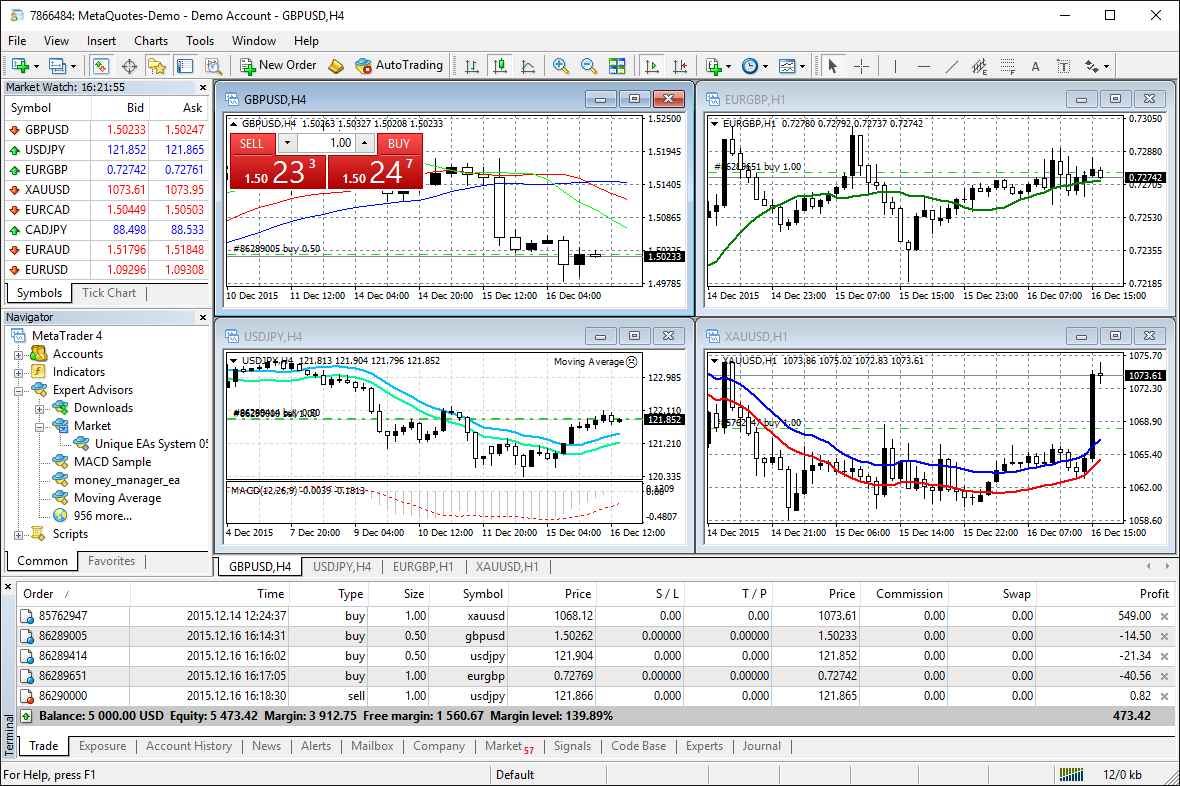
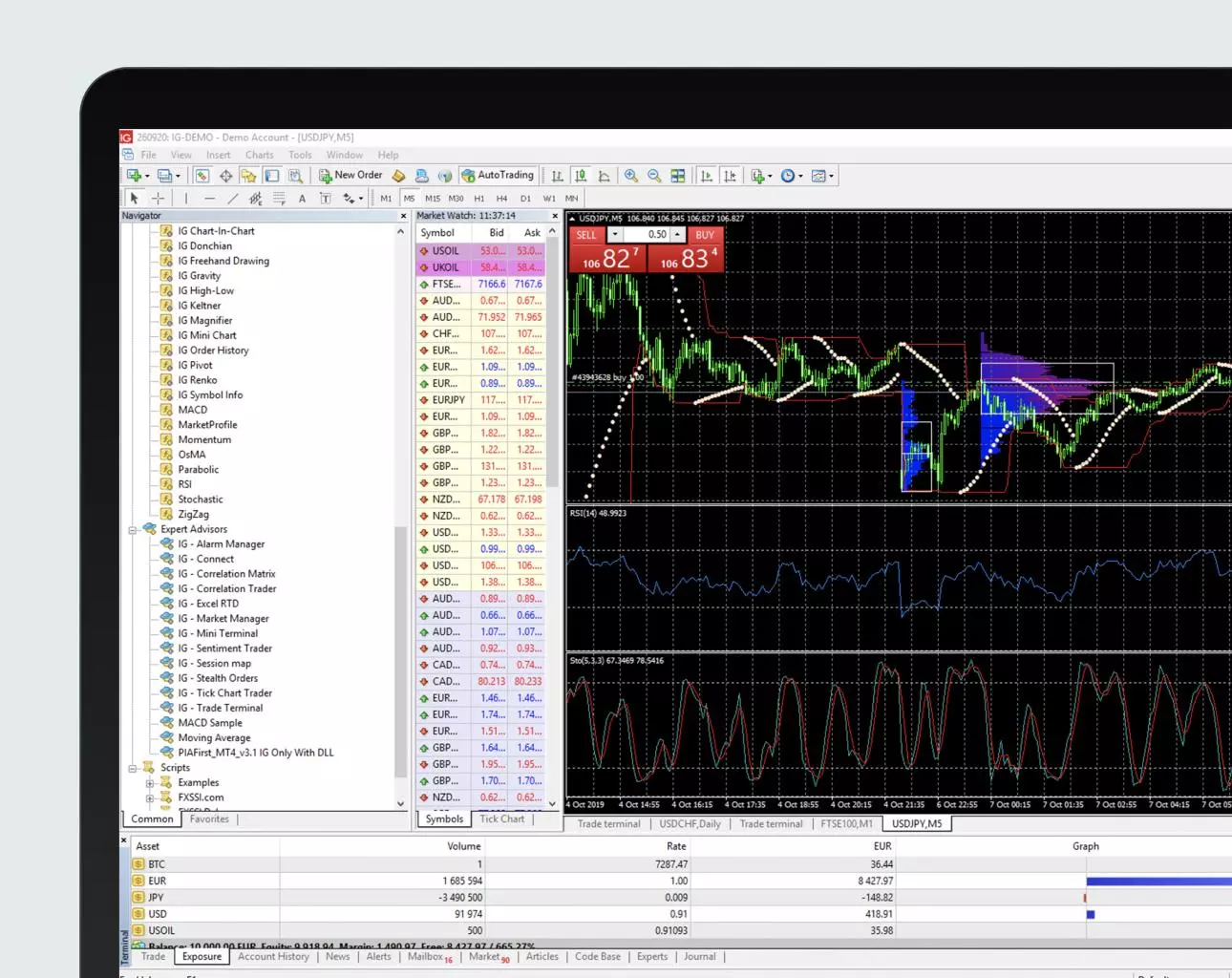
MT4 stands out as one of the most used platforms in forex trading. It connects you to brokers’ servers for live data on majors like EUR/USD or exotics. You get over 30 built-in indicators, such as moving averages and RSI, to spot trends. Custom scripts and EAs let you automate trades based on your rules, like entering positions when conditions align.

Think about how real-time quotes update every second. This speed helps you react to news events without delay. The platform supports multiple order types, from market to pending, giving flexibility in volatile markets. Have you ever missed a trade because of slow software? MT4 minimizes that risk.
Here’s the breakdown of its everyday use. Traders open charts with nine timeframes, from one-minute to monthly, to match their style. Multi-asset support covers forex, CFDs, and futures too. Backtesting tools let you replay historical data, refining strategies before going live.
What are the Key Features of MT4 for Forex Trading?
MT4 includes over 30 technical indicators, nine order types, multi-timeframe charts, and mobile synchronization as its core features for forex trading. For example, technical indicators like MACD and Bollinger Bands help analyze price action simply. You apply them with a click, and they update live.
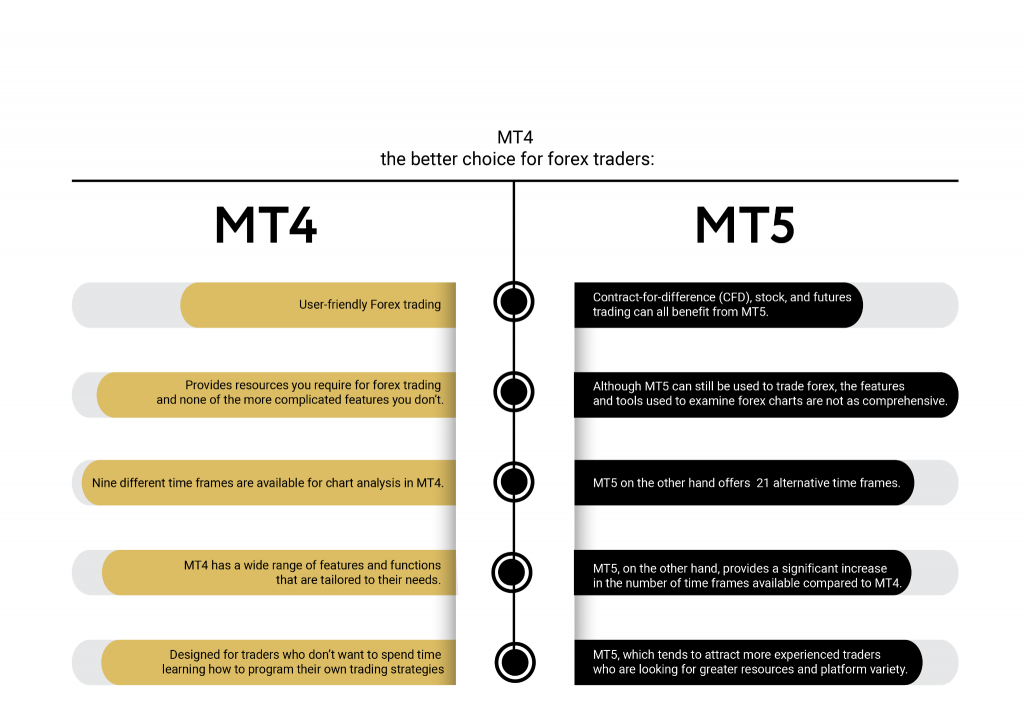
Order types stand out for control. Market orders execute instantly at current prices. Limit orders wait for your target, while stop-loss protects against losses. Pending orders like buy-stop trigger above the market, perfect for breakouts. These tools suit scalpers or swing traders alike.
Multi-timeframe charts let you zoom across M1 to MN, spotting alignments. Synchronization across devices keeps your analysis consistent, whether on PC or phone. Push notifications alert you to price levels remotely.
Data from broker reports shows MT4 handles high volumes smoothly. Over 80% of retail forex brokers offer it, per industry stats. Custom EAs, coded in MQL4, automate tasks like trailing stops. You download thousands free from the community or code your own.
Strategy Tester backtests EAs on years of tick data, showing profit factors and drawdowns. One-click trading speeds entries, vital in fast markets. News feeds integrate economic calendars, so you plan around releases.
These features combine for a powerful setup. Traders report higher accuracy with synced charts and alerts.
Is MetaTrader 4 Free to Download?
Yes, MetaTrader 4 is free to download from MetaQuotes or brokers, with no licensing fees, just a broker account for demo or live trading access. In detail, this covers the no-cost model and what you need to start.
The platform itself costs nothing. MetaQuotes provides the .exe or app files directly. Brokers customize versions with their branding but charge zero for the software. You download, install, and log in with server details from your broker.
No hidden fees apply to core use. Trading involves spreads or commissions from your broker, but MT4 remains free forever. Demo accounts use virtual money indefinitely, ideal for practice.
Brokers like IC Markets or Pepperstone host servers you connect to. This setup gives real market data without deposits initially.
What are the System Requirements for MT4 on PC, Mac, Android, and iOS?
MT4 runs on Windows XP or later, Intel-based Macs, Android 4.0+, and iOS 9.0+ with basic RAM and processor specs. Specifically, PC needs suit older hardware too.
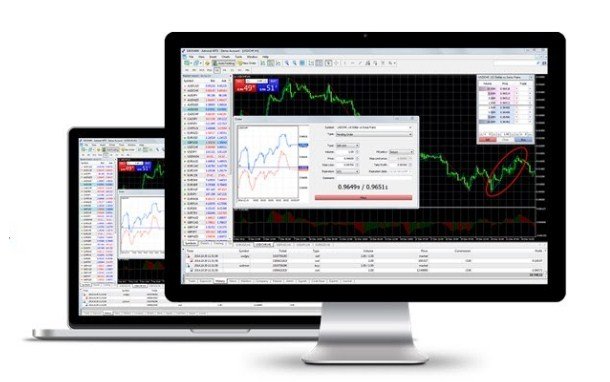
For Windows PCs, you need at least Pentium 1GHz CPU, 256MB RAM, and 30MB disk space. Windows XP SP3 through 11 work fine. Most laptops from the last decade handle multiple charts smoothly. DirectX 9 graphics help for custom indicators.
Mac users download a native .dmg or use Wine for Windows version. Requirements match: Intel Core processor, 512MB RAM, macOS 10.12+. Native builds avoid compatibility issues.
Android devices require version 4.0 (Ice Cream Sandwich) or higher, 1GHz processor, and 512MB RAM. Apps from Google Play fit phones like Samsung Galaxy S3 or newer. Tablets get larger screens for charts.
iOS needs version 9.0 or later, on iPhone 5s up. App Store downloads ensure security. Both mobile versions sync trades and offer full charting.
These low specs mean broad access. A 2023 survey by Finance Magnates found 90% of traders’ devices meet them easily. Updates keep it lightweight, under 10MB for mobile.
How to Download and Install MT4 for PC (Windows)?
Download MT4 for Windows PC in 5 steps from MetaQuotes or your broker, resulting in a ready-to-trade desktop platform. Let’s explore the process with clear steps.
Start at metatrader4.com or your broker’s site. Click the Windows download button for the .exe file, around 5MB. Save it to Downloads.
Run the installer as administrator. Accept terms, choose install path like C:Program FilesMT4. It unpacks quickly, under a minute.
Launch MT4. A login window appears. Enter broker server, like “ICMarketsSC-Demo”, login ID, and password from your broker. Check “Save password” for ease.
Market watch populates with pairs. Customize charts via right-click. Add indicators from Navigator panel.
Test with a demo first. Right-click an account, trade EUR/USD. Adjust settings in Tools > Options for alerts.
Common issues? Firewall blocks servers, so allow MT4. Updates auto-download for security.
1. Visit metatrader4.com/en/download.
2. Select “MetaTrader 4 PC”.
3. Download metatrader4setup.exe.
4. Double-click to install, follow prompts.
5. Open and log in.
This setup gives full access to EAs and backtesting. Traders log 24/5 uptime.
How to Download MT4 for Mac?
Download MT4 for Mac using a .dmg file from MetaQuotes or brokers, or Wine for Windows version, in 4 steps for seamless setup. For instance, native Mac builds run directly.
Go to metatrader4.com or broker page, pick Mac download. Get the .dmg, double-click to mount.
Drag MT4.app to Applications folder. It installs without admin rights often.
Launch from Applications. Login same as PC: server, login, password.
Wine alternative: Install via PlayOnMac or WineBottler. Download Windows .exe, run through wrapper. Specs need macOS 10.12+, 2GB RAM.
Native versions support Retina displays for sharp charts. Syncs with mobile perfectly.
Steps:
1. Download MT4.dmg.
2. Mount and drag to Applications.
3. Launch MT4.
4. Enter broker details.
Brokers like XM offer direct Mac links. This method avoids virtualization lag.
How to Download MT4 for Android and iOS?
Download MT4 mobile apps from Google Play or App Store in 2 steps per platform, gaining push notifications and one-click trading on the go. Here’s the breakdown for quick mobile setup.
For Android, open Google Play, search “MetaTrader 4”. Top result from MetaQuotes. Tap Install, it takes seconds.
Open app, add account via “+” icon. Select broker server, enter login/password. Pairs load fast.
iOS mirrors this: App Store search “MetaTrader 4”, install from MetaQuotes. Same login process.
Features shine mobile. One-click trading panels execute buys/sells instantly. Gestures zoom charts. Push alerts ping on price crosses.
Full EA support runs strategies remotely. Charts match desktop with 30+ indicators.
1. Open store app (Play/App Store).
2. Search and install MT4.
3. Login with broker info.
4. Customize watchlist.
Battery optimization tips: Close unused charts. Data saver mode reduces usage.
How Do I Set Up a Demo Account After Downloading MT4?
Set up a demo account in MT4 across platforms by selecting new account and choosing demo server, getting $10,000+ virtual funds instantly for strategy testing. Universal steps apply everywhere.
In MT4, click File > Open Account or “+” on mobile. Pick your broker from list.
Choose demo server, like “Pepperstone-Demo”. Enter name, phone, currency. No real details needed.
Password generates automatically. Login now. Balance shows virtual USD.
Practice trades: Drag pairs to chart, place orders. Test EAs by dragging to chart.
Adjust leverage to 1:500 typically. Expires? Brokers renew easily.
Mobile adds fingerprint login for security. Desktop allows multi-accounts.
Why demo? Builds skills without loss. 70% new traders use it first, per broker data.
Steps:
1. File > Open an Account.
2. Select broker/demo.
3. Fill minimal form.
4. Login and trade.
Switch to live anytime by depositing. This risk-free start boosts confidence.
MT4 Advanced Comparisons and Broker Integrations
MT4 offers broker-specific custom versions with broad EA support, setting it apart from MT5’s netting system and cTrader’s advanced pricing for traders seeking flexibility and compatibility.
Furthermore, these comparisons reveal why MT4 remains a top choice for forex users focused on automation and broker variety.
What is the Difference Between MT4 and MT5?
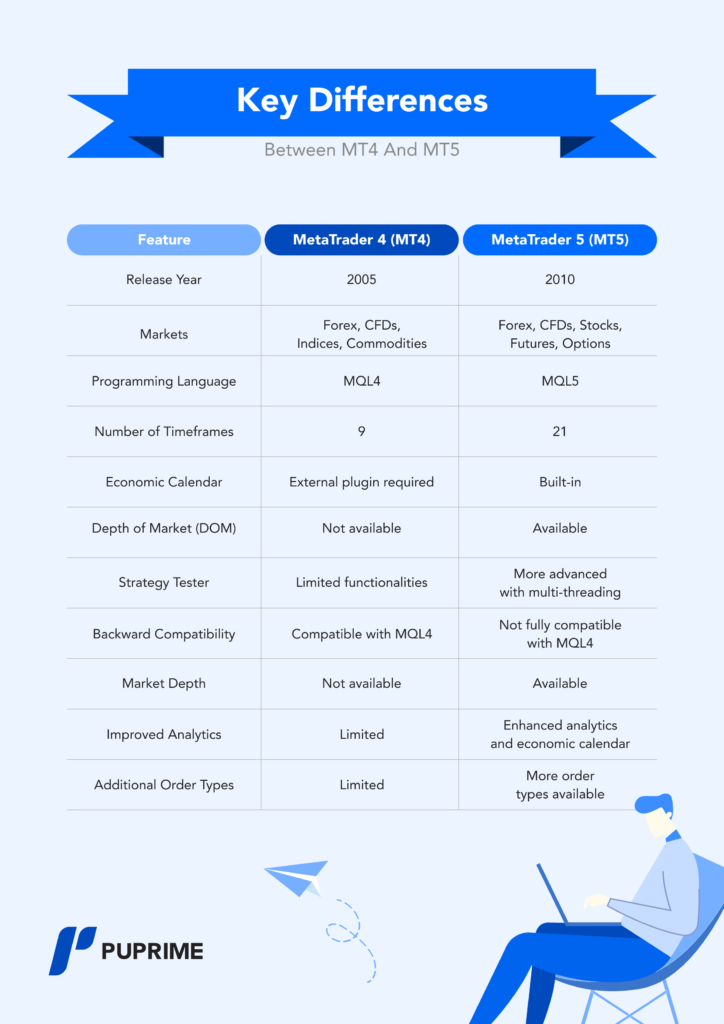
MT4 and MT5 differ mainly in programming languages, order types, and quote precision, with MT4 using MQL4 for simpler scripting and supporting hedging, while MT5 employs MQL5 with stricter netting and 5-digit quotes. MT4, launched in 2005, sticks to its proven 4-digit pricing model, which many traders prefer for straightforward calculations in volatile forex markets. In contrast, MT5’s 5-digit quotes provide finer pip precision, like showing 1.23456 instead of 1.2345, aiding scalpers but complicating legacy EAs.
You’ll notice MT4’s hedging allows multiple positions in the same direction, a feature MT5 restricts to netting, where buys and sells offset automatically. This makes MT4 better for strategies relying on correlated pairs. MQL4’s vast library of free EAs from sites like the Forex Expert Advisor Store runs seamlessly on MT4, but porting to MQL5 demands rewrites, slowing adoption.
For backtesting, MT4’s Strategy Tester handles historical data efficiently on desktops, though MT5 edges out with multi-threaded optimization. Traders sticking to MT4 avoid MT5’s steeper learning curve.
This distinction matters for EA users.
- Hedging flexibility: MT4 permits opposite positions; MT5 nets them, limiting some grid strategies.
- EA ecosystem: Thousands of MT4 EAs available; MT5 library grows but lags in compatibility.
- Quote handling: 4-digit suits beginners; 5-digit favors high-frequency trading.
Which Forex Brokers Offer the Best Free MT4 Downloads?
Brokers like IC Markets and Pepperstone provide the best free MT4 downloads with custom builds featuring low-latency servers and enhanced EA execution. IC Markets offers a tailored MT4 platform with ECN pricing starting at 0.0 pips, ideal for scalpers, and includes one-click trading plugins not always standard. Their download links direct to optimized installers that integrate seamlessly with VPS services for 24/7 EA operation.
Pepperstone stands out with its Razor MT4 account, delivering custom indicators and faster order fills via Equinix NY4 servers. Both brokers supply virus-free, direct downloads without bloatware, unlike generic MetaQuotes links. Other notables include XM for beginner-friendly MT4 with bonus credits for EAs, and FP Markets for multi-asset MT4 supporting crypto pairs.
Users benefit from broker-specific versions that preload instruments and reduce slippage. Always verify regulation via ASIC or CySEC for safety.
Choosing depends on your style.
- IC Markets: Ultra-low spreads, cTrader alternative but MT4 excels in EA speed.
- Pepperstone: Custom tools like Sentiment Trader widget embedded in MT4.
- XM: Free VPS for high-volume EA traders, easy mobile sync.
Can MT4 Support Expert Advisors (EAs) on Mobile Platforms?
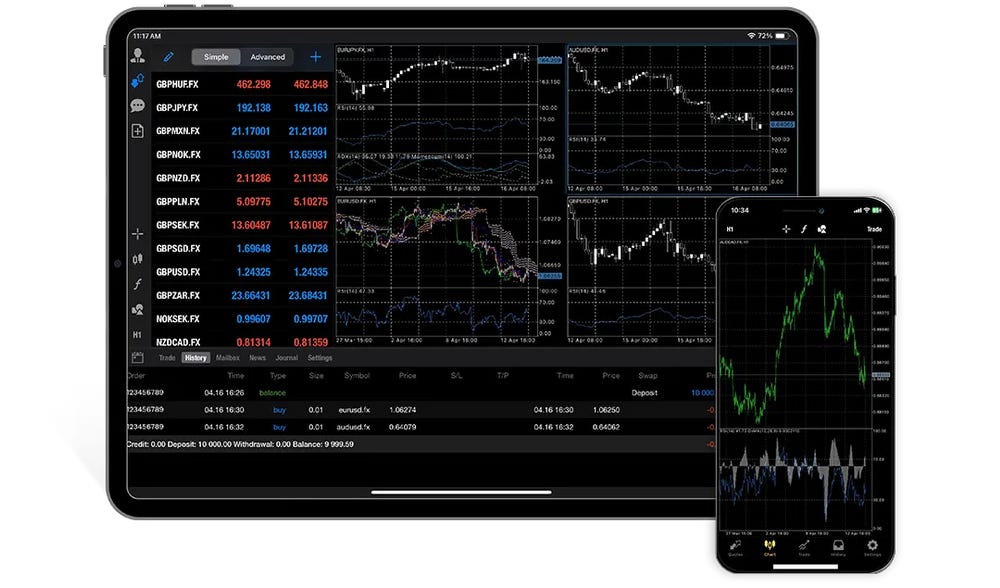
MT4 supports basic EA monitoring on mobile but lacks full execution and backtesting on Android/iOS, reserving advanced features for desktop versions. The MT4 Android app lets you attach EAs to charts for real-time alerts and trade management, yet automated trading halts without desktop linkage. iOS versions mirror this, showing EA signals via push notifications but requiring manual intervention for entries.
Desktop MT4 shines with the Strategy Tester for optimizing EAs on years of tick data, a capability mobile apps omit due to processing limits. Mobile EA use suits oversight, like pausing strategies during news, but full automation demands a PC or VPS. From the Forex Expert Advisor Store, popular EAs like moving average crossovers run flawlessly on desktop MT4, syncing trades to mobile for review.
Workarounds include cloud VPS running MT4, accessible via mobile remote desktop apps. This setup enables 99.9% uptime for EAs without local hardware.
Mobile limitations push strategic planning.
- Android/iOS constraints: View-only mode; no Strategy Tester or optimization.
- Desktop advantages: Full backtesting with 99% modeling quality on tick data.
- VPS solution: Run EAs remotely, monitor via MT4 mobile for low latency.
How Does MT4 Compare to Other Trading Platforms Like cTrader?
MT4 compares favorably to cTrader through its unmatched popularity and EA library, though cTrader offers Level II pricing for depth-of-market insights. MT4’s global user base exceeds 10 million, driving a massive repository of free and paid EAs, while cTrader, from Spotware, appeals to pros with detachable charts and superior DOM for seeing bid/ask ladders beyond MT4’s basic market watch.
MT4 processes orders via simple market or pending types, sufficient for most retail forex, but cTrader’s algorithmic hedging and volume-based fills suit institutional styles. EA-wise, MT4’s MQL4 enables custom automation out-of-the-box; cTrader’s cBots require C# knowledge, narrowing its library. Both platforms download free from brokers, yet MT4 integrates with more, like IC Markets offering both.
For niche users, MT4 wins on community scripts; cTrader on visual backtesting previews. Scalpers might prefer cTrader’s execution stats, but MT4’s ubiquity ensures better broker support.
Pick based on needs.
- Popularity edge: MT4 has broader broker availability and EA sharing.
- Pricing depth: cTrader’s Level II shows order book; MT4 relies on broker feeds.
- Customization: MT4 EAs simpler for beginners; cTrader for coders seeking advanced algos.
