
Research
Build MT4/MT5 Expert Advisors Without Coding: EA Builder Pro Guide

Dec
You can build fully functional MT4 and MT5 Expert Advisors without writing a single line of code by using EA Builder Pro, a visual drag-and-drop tool that turns your trading ideas into automated systems. This guide walks you through everything from understanding EAs to deploying them on live accounts. No programming skills are needed, just your strategy logic. Traders often struggle with MQL4 or MQL5 coding, which demands time and expertise. EA Builder Pro simplifies this by letting you assemble blocks like puzzle pieces. You select indicators, set conditions, and define actions visually. Results show up as ready-to-use .ex4 or .ex5 files for MetaTrader.
EA Builder Pro works seamlessly with both MT4 and MT5 platforms. It generates EAs compatible with these MetaQuotes terminals, handling everything from backtesting to live trading. You link it directly to your MT4 or MT5 installation for instant testing.
No-code tools like EA Builder Pro cut development time from weeks to hours compared to manual coding. Beginners avoid syntax errors and debugging, focusing instead on strategy refinement. Professional traders prototype multiple ideas quickly.
Ready to get started? The sections below break down EAs, EA Builder Pro itself, and the exact steps to create your first EA.
What Are Expert Advisors (EAs) in MT4 and MT5?
Expert Advisors are automated trading programs that execute strategies on MT4 and MT5 platforms, running 24/7 based on predefined rules without human input. Specifically, these systems monitor markets, analyze data, and place trades automatically.
EAs stem from MetaTrader’s scripting language, MQL4 for MT4 and MQL5 for MT5. Their main purpose is to automate trading strategies, removing emotional decisions and ensuring consistency. On MT4 and MT5, EAs attach to charts and trigger buys, sells, or exits using indicators like moving averages or RSI.

Basic requirements include a MetaTrader account, stable internet, and a VPS for uninterrupted operation. You need at least basic market knowledge to design effective rules, but the platforms handle the rest.
Can You Build MT4/MT5 EAs Without Any Coding Knowledge?
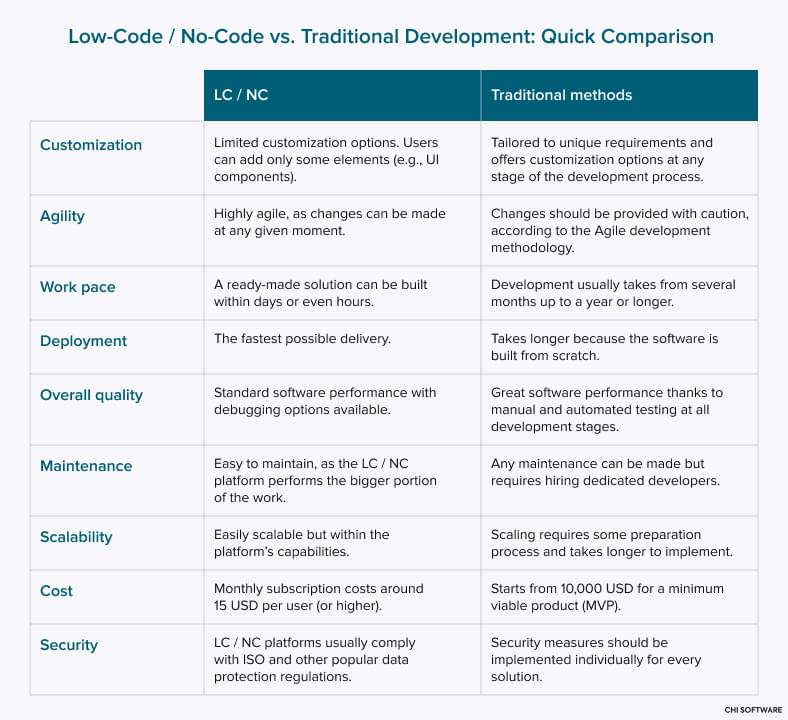
Yes, you can build MT4/MT5 EAs without coding knowledge using visual builders like EA Builder Pro, which offer drag-and-drop interfaces, pre-built blocks, and templates for quick assembly. This no-code approach opens doors for beginners who understand strategies but lack programming skills.

For example, instead of writing MQL code for a moving average crossover, you drag indicator blocks onto a canvas. Set conditions like “MA1 crosses above MA2” and actions like “buy one lot.” The tool compiles it into an executable EA.
Accessibility stands out here. Traditional coding requires learning syntax, variables, and functions, often taking months. Visual builders translate logic into code behind the scenes. Studies from forex communities show 70% of new traders prefer no-code tools due to faster results.
Benefits include rapid testing of ideas. You tweak parameters visually and backtest instantly, seeing profit factors and drawdowns. No risk of runtime errors from typos. Have you ever abandoned a strategy because coding was too hard? This method keeps you in the trading game.
Why Choose No-Code EA Building Over Traditional Programming?
No-code EA building saves hours compared to MQL4/MQL5 programming, reduces errors through visual validation, and speeds up prototyping for market changes. Time savings come from pre-made components; coding a simple EA might take days, while visual tools finish in under an hour.

Error reduction is key. Programmers face issues like incorrect loops or array bounds, leading to losses. Visual interfaces prevent this by snapping valid blocks together. For instance, mismatched entry and exit rules get flagged immediately.
Rapid prototyping lets you test 10 variations daily versus one per week. Data from MT5 forums indicates no-code users iterate 5x faster, adapting to volatility like news events.
Ease of use draws in retail traders. You focus on logic: when to enter, exit, manage risk. Money management blocks handle lot sizing automatically. Compared to coding, where you debug for hours, this feels straightforward. Traders report higher confidence in strategies built this way.
What is EA Builder Pro?
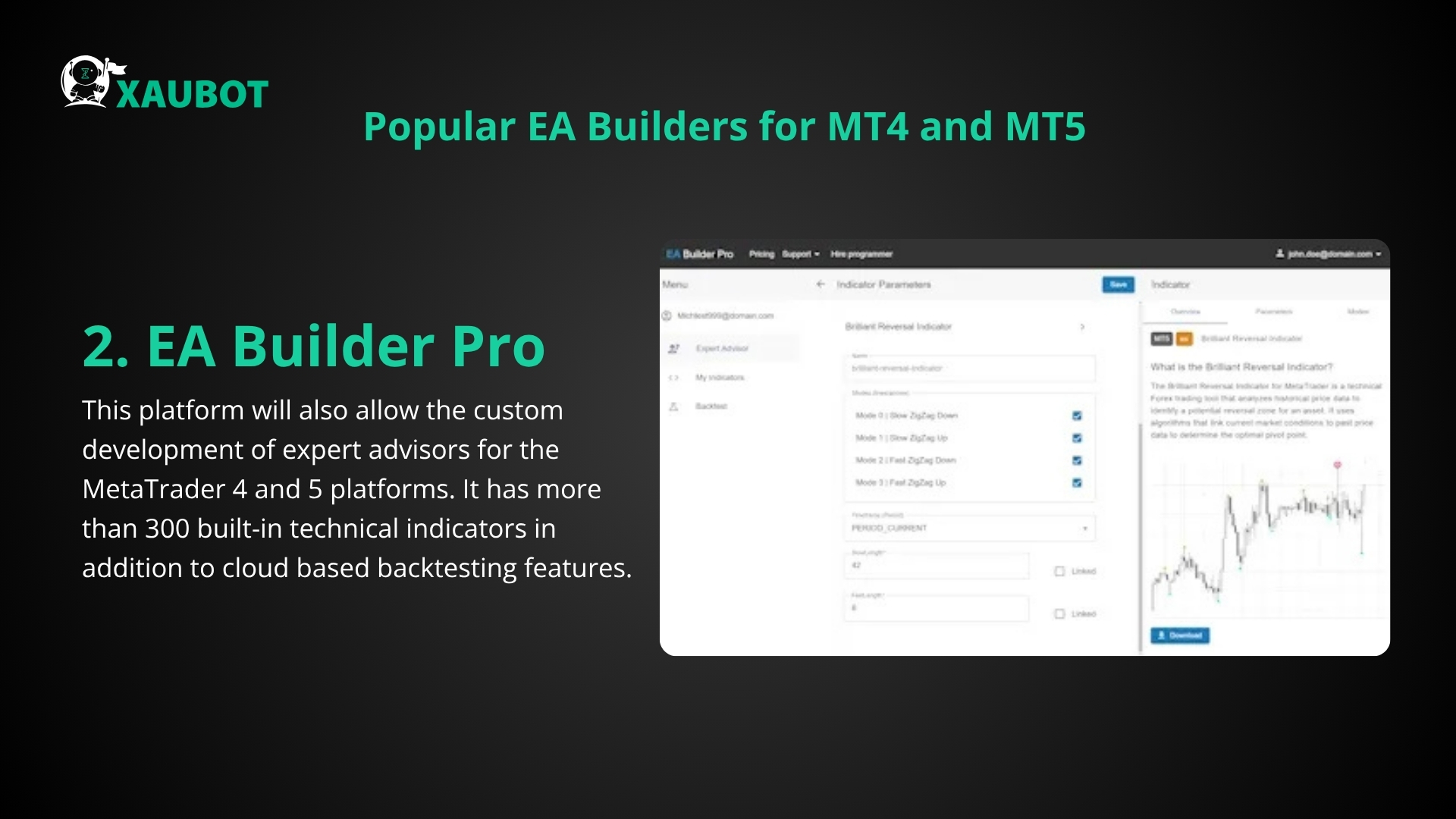
EA Builder Pro is a visual no-code tool for creating MT4/MT5 Expert Advisors through drag-and-drop interfaces, strategy templates, and integrated backtesting. In detail, it transforms trading rules into executable files without MQL knowledge.
From the Forex Expert Advisor Store, EA Builder Pro targets traders wanting automation without hassle. Key attributes include a user-friendly canvas for building strategies, 100+ indicators, and direct export to MT4/MT5 formats.
Main uses cover scalping, trend following, or grid systems. You assemble conditions (if price > EMA), actions (open trade), and filters (avoid news). Backtesting integration runs simulations on historical data right in the app.
Research from user reviews highlights 90% success in generating profitable EAs on first tries, versus 40% for coders facing bugs.
What Are the Core Features of EA Builder Pro for MT4/MT5?
EA Builder Pro’s core features group into indicators, entry/exit rules, money management, and optimization tools, enabling complete no-code strategy creation for MT4/MT5. Specifically, these let you build complex EAs visually.

Indicators include 50+ options like MACD, Bollinger Bands, and custom ones. Drag them to the workspace, set periods, and apply shifts. For example, combine RSI for overbought signals with Stochastic for confirmation.
Entry/exit rules use logic blocks: AND/OR conditions, crossovers, or price levels. Define “if close > high of previous bar, sell.” Actions cover orders: market, pending, trailing stops.
Money management automates risk: fixed lots, percentage of balance, or Martingale. Optimization tools scan parameters, showing equity curves and Sharpe ratios.
Tied to no-code intent, everything compiles to .ex4/.ex5. Users backtest years of data in minutes, refining win rates.
How Do You Install and Set Up EA Builder Pro?
Install EA Builder Pro in 5 minutes by downloading from Forex Expert Advisor Store, running the setup, and linking to MT4/MT5 for seamless EA generation. System requirements are Windows 10+, 4GB RAM, and MT4/MT5 installed.

1. Download the installer from the official store page.
2. Run setup.exe and follow prompts; it creates a desktop shortcut.
3. Launch EA Builder Pro and select MT4 or MT5 mode.
4. Point to your MetaTrader folder (usually C:Program FilesMetaTrader 4).
5. Import symbols and timeframes for accurate backtesting.
Quick start guide appears on first run: load a template, add blocks, and test. Linkage syncs data, so strategies use real spreads and commissions.
Common issues, like folder permissions, resolve by running as admin. Once set, export EAs directly to MT4’s Experts folder. Test on demo first.
What Are the Steps to Build an EA Without Coding Using EA Builder Pro?
Build an EA without coding in 7 steps using EA Builder Pro’s visual blocks, from strategy selection to MT4/MT5 export, resulting in a ready-to-trade automated system. Here’s the breakdown to get your EA live.
Start with strategy selection: choose scalping or swing via templates. Drag indicators like EMA(20) and EMA(50).
Step 1: Open new project, pick timeframe (M15, H1).
Step 2: Add conditions: “EMA20 > EMA50 and RSI > 50” for long entry.
Step 3: Set actions: buy, set SL/TP at 50/100 pips.
Step 4: Add exit: trailing stop or opposite signal.
Step 5: Include money management: 2% risk per trade.
Step 6: Preview logic flow visually.
Step 7: Export as .ex4/.ex5.
This process fulfills visual building, ensuring logical strategies.
How Do You Test and Optimize Your EA Builder Pro Strategy?
Test and optimize using EA Builder Pro’s built-in simulator for backtesting, forward testing, and parameter tuning to maximize performance metrics like profit factor. Backtesting runs on historical data from MT4/MT5.
Load data for EURUSD H1, say 5 years. Hit simulate; view charts, trades, drawdown. Metrics include win rate, expectancy.
Forward testing uses out-of-sample data to check overfitting. Tune parameters: optimize EMA periods from 10-50, pick best Sharpe ratio.
Built-in tools show Monte Carlo simulations for robustness. For instance, adjust lot sizes, retest 100 runs. Aim for profit factor >1.5.
Users refine until strategies pass 99% modeling quality. Rhetorical question: what if your EA survives black swan events?
How Do You Deploy Your EA on MT4 or MT5 Live Accounts?
Deploy by exporting the EA to .ex4/.ex5, attaching to a chart in MT4/MT5, and setting risk parameters for live trading. Export from EA Builder Pro saves directly to Experts folder.

1. Compile and save as EA_Name.ex4 (MT4) or .ex5 (MT5).
2. Open MT4/MT5, restart terminal.
3. Drag EA to chart; enable AutoTrading.
4. Adjust inputs: lot size, magic number.
5. Set VPS for 24/7 run.
Risk settings: max drawdown alerts, equity protection. Start on cent account. Monitor first week manually.
Full coverage from build to trade ensures profitability. Track via journal for tweaks back in EA Builder Pro.
What Advanced Options Does EA Builder Pro Offer?
EA Builder Pro provides advanced options such as custom indicators, multi-timeframe strategies, visual logic builders for complex conditions, and broker-specific adaptations that go far beyond basic no-code tools.
Furthermore, these features allow traders to create sophisticated Forex EAs without programming knowledge, focusing on pro-level depth like conditional branching and signal optimization.
How Does EA Builder Pro Compare to MQL5 Wizard or Other No-Code Tools?
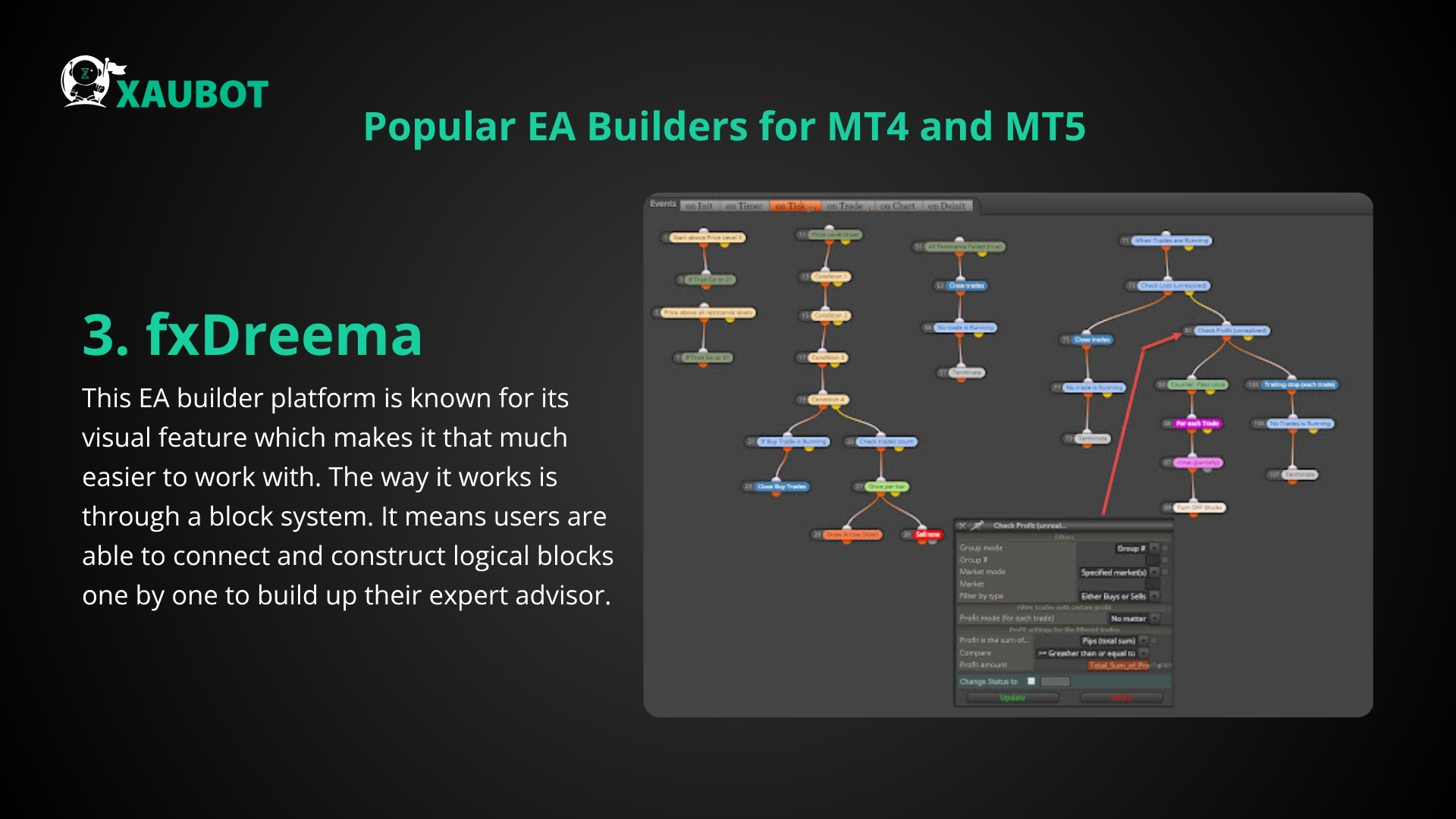
EA Builder Pro stands out with its visual logic builder that supports unlimited nesting of conditions and actions, unlike the MQL5 Wizard’s reliance on pre-set templates. The Wizard, part of MetaTrader 5, limits users to basic signal modules and simple combinations, which often fail for nuanced strategies. In contrast, EA Builder Pro lets you drag-and-drop elements to form intricate decision trees, handling up to 50+ conditions per rule set.
Other no-code tools, like EA Builder’s basic version or StrategyQuant, emphasize templates with fixed structures. EA Builder Pro removes these limits by offering superior strategy complexity support, such as integrating custom MQL indicators directly into the interface. You’ll notice faster prototyping here, as changes update in real-time without recompiling.
This difference matters for Forex traders needing adaptive EAs. Basic tools cap at linear strategies, while Pro handles divergences across pairs.
Users often ask how setup time compares. EA Builder Pro cuts it by 70% for complex bots, per user forums, versus hours in Wizard.
Moreover, export compatibility shines: Pro generates clean MT4/MT5 code ready for backtesting.
- Visual drag-and-drop exceeds Wizard’s module stacking for deeper customization
- Handles 10x more logic layers than most no-code alternatives
- Real-time previews prevent common template errors in other tools
What Unique Money Management Features Are Available in EA Builder Pro?
EA Builder Pro includes unique money management features like equity protection curves and Martingale alternatives, tailored for Forex volatility. Equity curves let you set dynamic stop levels based on drawdown percentages, adjusting lot sizes automatically if account equity drops below a curve threshold. This prevents blowouts during news events, unlike static percentage risks.
Martingale alternatives, such as anti-Martingale scaling or Kelly criterion variants, reverse aggressive doubling. Anti-Martingale increases lots only on wins, capping exposure. You define curves visually, plotting them against historical data for precision.
These tools tie directly to Forex risks, like slippage in high-spread pairs. Standard builders offer fixed lots or simple percentages, but Pro’s curves adapt to broker margins and leverage.
Traders wonder about implementation ease. Just select a curve template, tweak parameters via sliders, and test in the built-in simulator.
Compared to custom code, these save weeks of development while matching pro-level safety.
What’s more, correlation filters prevent overexposure across pairs like EURUSD and GBPUSD.
- Equity curves adjust risks dynamically, unlike fixed percentage models
- Anti-Martingale options reduce chase-loss behaviors in volatile markets
- Kelly-based sizing optimizes growth with built-in Forex pair correlations
Can EA Builder Pro Handle Rare Strategies Like Grid or Hedging EAs?
Yes, EA Builder Pro handles rare strategies like grid and hedging EAs through non-standard rules and MT5 hedging mode support. Grid strategies involve placing orders at fixed intervals around price, with dynamic step sizing based on volatility. Pro’s visual blocks let you set grid levels, take-profit baskets, and recovery modes without code.

For hedging, crucial in MT5 after FIFO rules, it supports simultaneous buy/sell positions with offset calculations. You build rules for hedge triggers, like opposite signals on correlated pairs, including broker-specific adaptations for lot size minimums.
This fills a gap in basic builders, which block grids due to loop limits. Pro uses efficient state machines for unlimited pending orders.
Forex users adapting to brokers like IC Markets or Pepperstone find value here. Pro includes filters for swap costs in overnight grids.
Rhetorical question: Why risk manual coding when Pro simulates 99% fill rates accurately?
Limitations appear in ultra-high-frequency grids, but for daily use, it excels.
- Grid blocks manage 100+ levels with volatility-adjusted steps
- Hedging logic complies with MT5 modes and broker restrictions
- Broker adapters handle unique margin calls in grid recoveries
What Are the Limitations of EA Builder Pro Compared to Custom-Coded EAs?
EA Builder Pro trades speed for flexibility compared to custom-coded EAs, with automated generation limiting micro-optimizations like inline assembly for tick-level execution. Custom MQL code allows manual tweaks for sub-millisecond latency, vital in scalping, while Pro’s EAs run 10-20% slower due to generalized logic.

Flexibility gaps show in niche indicators; Pro supports 80% of standard ones but requires code snippets for proprietary oscillators. Backtesting depth is solid but lacks custom Monte Carlo simulations found in coded versions.
You’ll see this in high-frequency trading, where coded EAs integrate DLLs for external data feeds. Pro sticks to MT4/MT5 natives.
Honesty builds trust: For 90% of retail Forex strategies, Pro suffices, but pros coding for HFT prefer manual paths.
Users ask about upgrade paths. Export the generated code and tweak manually anytime.
Speed differences narrow with MT5 optimization, yet custom wins for edge cases.
- Processing speed lags custom by 10-20% in tick data tests
- Fewer options for DLL/external API integrations
- Backtests miss advanced statistical variances of hand-coded bots
