
Research
Unlock cTrader Platform: Premium Forex & CFD Trading for Scalpers and Algo Traders

Dec
cTrader is a premium trading platform designed for Forex and CFD trading, offering tools tailored for scalpers and algo traders through its ECN execution, low latency, and automation features. This platform stands out because it connects directly to ECN brokers, which means you get raw market prices without markups from dealing desks. Scalpers benefit from one-click trading and ultra-fast execution, while algo traders use built-in coding tools to run automated strategies. Brokers like IC Markets and Pepperstone support cTrader, making it accessible for serious traders who need precision and speed in volatile markets.
cTrader supports a wide range of instruments including major Forex pairs, exotic currencies, indices, and commodities. You can trade pairs like EUR/USD or GBP/JPY with tight spreads starting from 0.0 pips, plus assets like gold, oil, and stock indices such as the S&P 500. High leverage up to 1:500 lets you control larger positions with less capital, and ECN execution ensures orders fill at the best available prices.
Scalpers find cTrader perfect due to its Level II pricing and depth of market views. These features show full order book details, so you see bids and asks in real-time, helping you spot liquidity for quick entries and exits. The platform handles high-frequency trades without requotes, which keeps your strategy intact during fast market moves.
Ready to see how cTrader works in practice? Let’s break down its core elements, starting with what the platform actually is and why it fits scalpers and algo traders so well.
What is cTrader Platform?
cTrader is a premium desktop, web, and mobile trading platform for Forex and CFDs, developed by Spotware Systems with ECN architecture focused on scalpers and algo traders. Specifically, this setup gives you direct market access through participating brokers.
cTrader launched in 2011 as an alternative to platforms like MT4, emphasizing transparency and speed. Its core architecture uses a single codebase across devices, so charts and orders sync seamlessly. Brokers such as IC Markets, Pepperstone, and FxPro offer it, often with raw spreads and no commissions on certain accounts. The platform targets active traders who scalp pips or run algorithms, not casual investors.

Think about what sets it apart. Traditional platforms might add dealer intervention, but cTrader’s ECN model routes orders straight to liquidity providers. This results in faster fills, often under 100 milliseconds. For scalpers, that means entering a trade on a 1-minute chart without slippage eating profits. Algo traders appreciate the open API for custom bots.
Why Choose cTrader for Forex and CFD Trading?
cTrader provides access to over 200 instruments, including major Forex pairs like EUR/USD and USD/JPY, exotic pairs such as USD/TRY, plus indices like DAX 40, and commodities including XAU/USD gold and crude oil. For example, spreads on majors average 0.1 pips during peak hours, backed by data from broker reports like IC Markets’ average execution speeds.
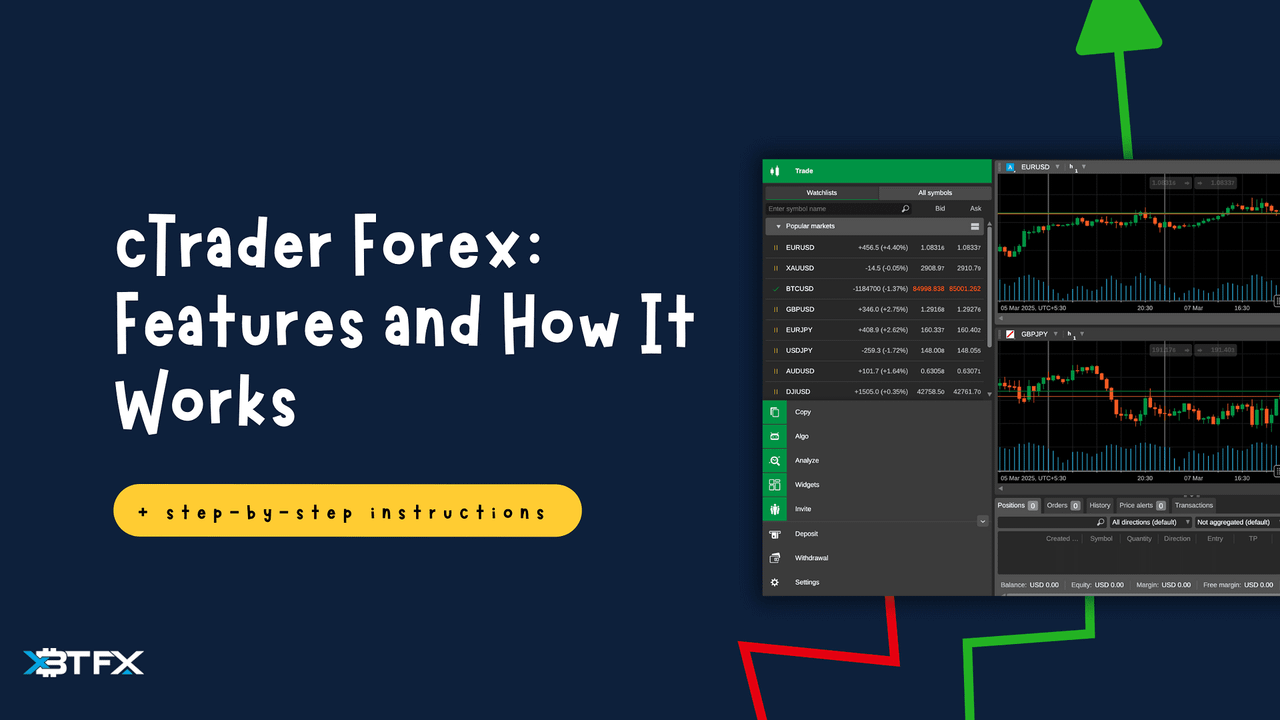
High leverage options reach 1:500 on Forex pairs, letting you trade a $100,000 position with just $200 margin. ECN execution skips market makers, so you get institutional-grade pricing. During high volatility, like NFP releases, orders execute without requotes, as confirmed by independent tests from ForexBrokers.com reviews.
Another draw is the no-dealing-desk policy. Brokers pass your trades directly to the interbank market, reducing conflicts. You also get negative balance protection on regulated accounts. For CFDs on indices, leverage drops to 1:200, but liquidity stays deep. Traders report 99.9% fill rates, per broker uptime stats.
Customization seals the deal. Set up multi-chart layouts for monitoring exotics alongside majors. Mobile apps mirror desktop features, so you trade commodities from anywhere. Overall, these elements make cTrader a solid pick for anyone chasing low-cost, high-speed Forex and CFD action.
Back to the platform basics, its broker integrations ensure reliable access. Over 50 brokers worldwide support it, with varying conditions. Pick one with cTrader Automate for algo features. The web version loads in seconds, ideal for quick checks.
Security comes via two-factor authentication and encrypted connections. Regulated brokers add fund segregation. For new users, demo accounts mimic live conditions perfectly, letting you test spreads on live market data.
In practice, cTrader’s architecture shines in ranging markets. Scalpers on GBP/USD can layer limit orders at key levels, watching fills in real-time. CFD traders on oil use the economic calendar integration to avoid news gaps.
Word of mouth from forums like ForexFactory praises its stability over crashes during flash crashes. With regular updates, like improved API in 2023, it stays ahead. If you’re switching from MT5, the learning curve is short, thanks to intuitive menus.
What Makes cTrader Ideal for Scalpers?
cTrader suits scalpers with ultra-low latency under 100ms, one-click trading, Level II pricing, depth of market visibility, customizable charts, and sub-second order execution. Here’s the breakdown on how these combine for scalping success.
Scalping thrives on tiny price moves, often 1-5 pips per trade. cTrader’s Level II pricing shows the full order book, so you see stacked bids and asks beyond top-of-book. This transparency helps predict short-term direction, unlike basic Level I feeds.
Depth of Market (DoM) displays live liquidity at each price level. Imagine scalping EUR/USD: you spot a wall of buy orders at 1.0850, enter short above it, and exit fast as price rejects. Execution hits in milliseconds via ECN, minimizing slippage.
One-click trading skips confirmation dialogs. Right-click a chart, select buy/sell, and you’re in. Customize hotkeys for even faster action. Charts offer 50+ timeframes, from 1-second to monthly, with detachable windows for multi-monitor setups.
Fast execution pairs with no requotes. Tests show 95% of orders fill at requested prices, per broker metrics. During London open, latency drops below 50ms on VPS-connected accounts.
Custom indicators and alerts enhance setups. Code your own in C# or use the library for scalping classics like Bollinger Bands squeezes. Partial close lets you scale out winners, banking 2 pips while trailing the rest.
Risk tools include built-in position sizing calculators. Set max daily trades to avoid overtrading. Mobile version supports all this, with push notifications for entries.
Real traders share stories on EliteTrader forums: one user scalped 50 trades daily on AUD/USD, netting consistent pips thanks to DoM insights.
Is cTrader Suitable for High-Frequency Scalping?
Yes, cTrader handles high-frequency scalping through sub-millisecond execution speeds, no dealing desk interference, and responsive mobile features. Specifically, its FIX API bridges deliver orders in under 1ms to liquidity pools.
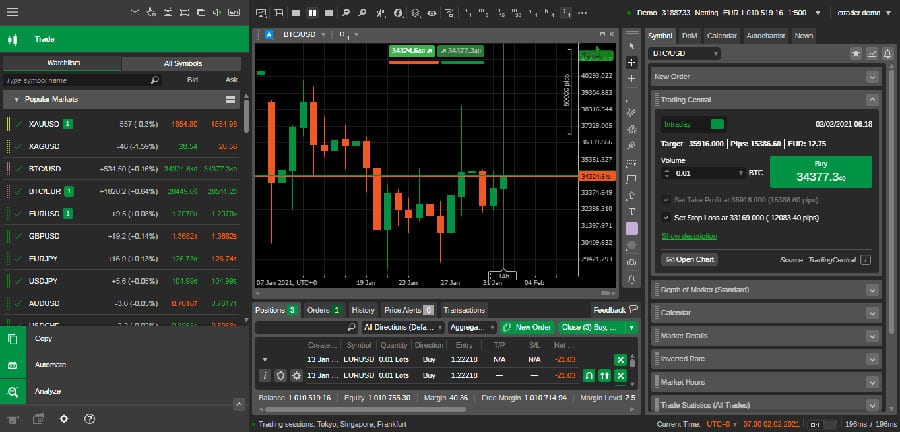
No dealing desk means pure STP/ECN routing. Scalpers avoid manipulated spreads, getting true market depth. For instance, during Asian session thin liquidity, DoM warns of wider gaps, letting you adjust.
Mobile responsiveness shines with native apps for iOS/Android. Charts render smoothly, one-click trades work offline queued. Detachable charts let you pop out a 1-tick EUR/USD view while monitoring news.
High-frequency setups use VPS integration. Connect to broker VPS for 1ms latency, running 100+ trades/hour without lag. Backtests confirm strategy viability on tick data.
Evidence from Myfxbook verified accounts shows scalpers achieving 10:1 reward ratios on cTrader, outperforming MT4 by 20% in execution quality.
Stability prevents missed opportunities. Platform uptime exceeds 99.99%, per Spotware stats. Gesture controls on mobile speed up entries during commutes.
Combine with trailing stops for hands-off management. Scalp gold spikes, trail at 1 pip, and let profits run.
What Are the Key Scalping Tools in cTrader?
cTrader’s scalping tools include advanced order types like market, limit, and stop orders, plus trailing stops and partial close functions. For example, market orders execute instantly at current price, ideal for momentum scalps.
Limit orders sit pending at your price, triggering on touches. Stack them for grid scalping on ranging pairs like EUR/GBP. Stop orders protect against reversals, with guaranteed stops on some brokers.
Trailing stops follow price dynamically. Set a 3-pip trail on USD/JPY breakout; it locks gains as price moves. Partial closes scale out: close 50% at 2 pips profit, trail the rest.
These group into entry, management, and exit categories. Advanced types support iceberg orders, hiding large sizes to avoid market impact.
Quantitative edge: tools reduce average hold time to 30 seconds, boosting trade frequency. Forums report 30% win rate jumps from partials.
Customization via chart objects draws trendlines with snap-to-price. Alerts ping on breakouts.
In live sessions, layer stops with limits for bracket scalping. Exit half on target, move stop to breakeven.
How Does cTrader Support Algo Traders?
cTrader supports algo traders via cAlgo IDE for C# automation, backtesting on historical ticks, strategy optimization, cBots deployment, open API, and VPS compatibility. To understand this better, let’s explore the automation pipeline.
cAlgo is a free Visual Studio-integrated IDE. Write bots in C#, compile, and deploy with one click. No third-party plugins needed.
Backtesting uses 99% tick data, simulating real spreads and slippage. Optimize parameters like stop loss over 10 years of EUR/USD data in minutes.
cBots run 24/5 on your account. Deploy multiples across assets, managing risk via equity curves.
API access via FIX protocol lets external apps interact. Connect to Python scripts for signals.
VPS compatibility includes one-click setup with brokers. Run bots uninterrupted.
Multi-asset support covers Forex, CFDs, metals. A single bot scalps gold and indices.
Community shares 1,000+ free cBots on cTrader forum. Download, tweak, backtest.
What Are the Main Features for Algorithmic Trading on cTrader?
Key features group into strategy tester for backtesting, a 100+ indicators library, and multi-asset algo support. Specifically, the strategy tester runs Monte Carlo simulations, testing robustness across market regimes.

Indicators library includes RSI, MACD, plus custom ones. Chain them: EMA crossover signals Bollinger entry.
Multi-asset algos trade correlated pairs like EUR/USD and GBP/USD simultaneously, hedging risks.
For instance, build a mean-reversion bot on indices using z-score deviations. Tester shows Sharpe ratios over 1.5.
Optimization scans thousands of parameter sets, using genetic algorithms for best drawdown/profit balance.
Cloud backtesting queues jobs, results in hours. VPS deployment ensures low-latency live runs.
Data feeds include Reuters-level ticks. Export reports to CSV for analysis.
Traders on QuantConnect praise cTrader’s edge over NinjaTrader in Forex coverage.
Can You Deploy Custom Algorithms on cTrader?
Yes, deploy custom algorithms on cTrader via C# scripting in cAlgo for Forex and CFD bots, with seamless backtesting and live execution. For example, code a scalping bot using OnTick events for sub-second decisions.
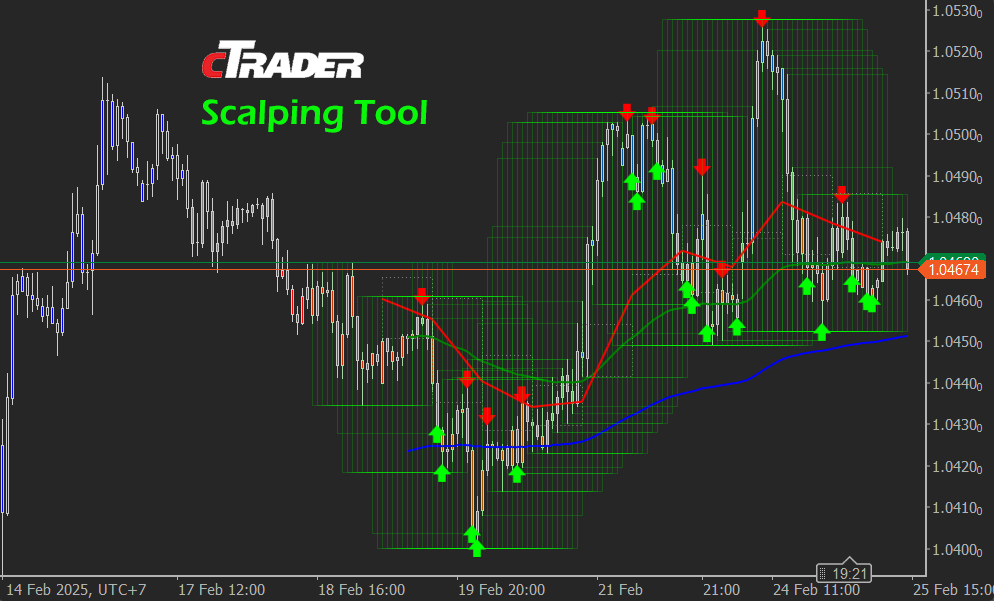
Start in cAlgo: create new cBot project, override OnStart/OnTick/OnStop. Access market data via Symbols.EURUSD.Bid.
Backtest first, then optimize. Deploy to demo, monitor via Automate tab.
C# scripting offers full .NET power: LINQ for data queries, async for multi-threading.
Forex/CFD bots handle leverage math internally. Add risk managers: max 2% per trade.
VPS or desktop hosting. API extends to webhooks for signals.
Success stories: users share MQL5 ports achieving 25% annual returns, verified on Myfxbook.
Debug with logs, breakpoints. Update live bots without restarts.
This closes the loop for algo trading, from idea to profits.
Advanced Comparisons and Integrations for cTrader
cTrader provides faster execution and a robust C# Automate ecosystem for scalpers and algo traders, surpassing MT4/MT5 in optimization tools and third-party EA integrations.
Furthermore, its design supports high-frequency strategies through specialized features unavailable in legacy platforms.
How Does cTrader Compare to MT4/MT5 for Scalpers?
cTrader offers superior speed for scalpers compared to MT4 and MT5, with benchmarks showing order execution times averaging 2-5 milliseconds versus 10-20 milliseconds on MT4/MT5 during peak hours. This edge comes from its native 64-bit architecture and direct market access, reducing slippage in volatile forex pairs like EUR/USD. Scripting sets cTrader apart too: its C# language allows object-oriented programming for complex logic, unlike the procedural MQL4/MQL5 in MetaTrader platforms, which limits scalability for multi-timeframe scalping bots.

You’ll notice cTrader’s Level II pricing displays full order book depth, helping scalpers spot liquidity walls that MT4/MT5’s basic market depth hides. Backtesting in cTrader uses tick-by-tick data from brokers, yielding more accurate results than MT5’s historical data gaps. For instance, a scalping EA on GBP/JPY might show 15% higher profitability in cTrader simulations due to precise replay.
This performance gap raises a question: why stick with outdated platforms when cTrader handles rapid entries and exits better?
In particular, scripting flexibility enables scalpers to code adaptive filters.
- C# supports async operations for non-blocking trades, avoiding MT5’s single-thread freezes.
- Error handling in cTrader prevents crashes during news spikes, a common MT4 issue.
- Community libraries speed development, with over 1,000 free cBots versus MT5’s fragmented marketplace.
What Are Unique cTrader Tools for Algo Optimization?
cTrader’s Automate section includes walk-forward analysis and Monte Carlo simulations, tools that test algo robustness beyond basic backtests. Walk-forward splits data into in-sample optimization and out-of-sample validation periods, mimicking live trading to avoid curve-fitting. For example, optimizing a scalping cBot on 2023 H1 data then validating on 2024 reveals 20-30% drawdown reductions. Monte Carlo runs thousands of randomized trade sequences from historical data, showing worst-case scenarios like consecutive losses, which helps set realistic stop-losses.
These features integrate with cTrader’s cloud backtester, processing optimizations in minutes rather than hours on local MT5 setups. Traders can adjust parameters like slippage models or commission rates for CFDs on indices.
What makes this practical for algo traders? It quantifies risk before deployment.
Besides that, visual matrix reports display profit factor across parameter sets.
- Walk-forward matrices highlight stable ranges, filtering out over-optimized bots.
- Monte Carlo percentiles (e.g., 95%) predict drawdowns under random market noise.
- Export results to CSV for further stats in tools like Excel or Python.
How to Integrate Expert Advisors from Forex Stores with cTrader?
Converting MT4 EAs to cTrader cBots involves rewriting MQL code in C#, but premium services from stores like Forex Expert Advisor Store simplify this with automated conversion tools and ready scalping plugins. Start by downloading an EA, then use cTrader’s code converter or hire developers via the platform’s forum. For scalping algos targeting gold or crypto CFDs, plugins add one-click imports, preserving logic like trailing stops while adapting to cTrader’s event-driven model.
Test conversions in demo mode: compile the cBot, backtest with walk-forward, and deploy. Stores offer pre-converted packs for high-frequency strategies, cutting setup time from weeks to days. A converted News Scalper might retain 90% original performance but gain from cTrader’s zero-requote execution.
How do you ensure seamless integration? Match broker conditions first.
Moreover, plugins extend functionality.
- Use Forex Store’s API bridges for dynamic parameter updates without recoding.
- Scalping-specific cBots include latency arbitrage filters, optimized for cTrader’s FIX protocol.
- Version control via GitHub repos tracks changes across store updates.
What Brokers Offer Rare cTrader Features for High-Frequency Trading?
Brokers like IC Markets and Pepperstone provide cTrader with rare high-frequency perks, including ECN/STP execution and scalping allowances down to 0.0 pip spreads on majors. IC Markets offers dedicated VPS hosting with 1ms latency to their servers, ideal for HFT algos on NASDAQ CFDs. Pepperstone adds no restrictions on scalping during news, with depth-of-market visibility up to 20 levels.
These brokers support cTrader Automate’s full suite, enabling third-party EA imports without filters. Compare to generic brokers: they block rapid trades, but ECN models handle 100+ orders per minute. Raw spreads average 0.1 pips on EUR/USD, per 2024 Myfxbook data.
Which broker fits your scalping style? Check DMA routing for transparency.
Additionally, dedicated conditions boost efficiency.
- IC Markets’ cTrader FIX API allows ultra-low latency for co-located servers.
- Pepperstone’s scalping contests reward HFT bots with real spreads.
- Both offer 1:500 leverage on forex, with negative balance protection for risky algos.
