
Research
Master Copy Trading MT4: Best Trade Copiers, Signals & Step-by-Step Setup

Dec
Mastering copy trading on MT4 involves using top trade copiers like Local Trade Copier, Forex Copier EA, and DupliTrade, paired with reliable signals from MQL5 or ZuluTrade, plus a simple step-by-step setup that lets you replicate expert trades automatically. This approach saves time and opens access to proven strategies without needing advanced skills. You just install an Expert Advisor (EA), link accounts, and watch trades copy over in real-time. MT4’s flexibility makes it ideal for this, as it supports both local and remote copying across multiple brokers.
The best trade copiers for MT4 are Local Trade Copier for its speed and multi-account handling, Forex Copier EA for flexible lot scaling, and DupliTrade for seamless plugin integration. These tools stand out because they minimize latency, offer risk controls, and work with most brokers. Local Trade Copier, available from the Forex Expert Advisor Store, handles dozens of slave accounts from one master without delays.
Top signals for MT4 copy trading come from MQL5 signals market, ZuluTrade’s MT4 bridge, and ForexSignals.com providers with verified win rates over 70% and low drawdowns under 15%. These sources provide transparent performance data, making it easy to pick winners. MQL5 alone hosts thousands of signals you can filter by metrics like profit factor.
Ready to get started? The sections below break down everything from basics to setup, so you can pick the right tools and go live confidently.
What is Copy Trading on MT4?
Copy trading on MT4 is an automated process where trades from a master account replicate to one or more slave accounts using Expert Advisors (EAs). Let’s explore the setup and benefits in more detail.
Copy trading works by having a master account act as the signal source. This could be your own profitable strategy or a subscribed provider’s trades. The slave account receives those trades instantly. An EA bridges them, copying everything from entry points to stop losses.

Think of it like this: the master places a buy order on EUR/USD. The EA detects it and mirrors the trade on the slave, adjusting lot sizes if needed. This happens on the same computer for local copiers or across servers for remote ones.
Benefits include time-saving since you don’t monitor charts yourself. You gain access to expert strategies from seasoned traders. Risk diversification spreads exposure across accounts. Data from MT4 users shows copiers can boost returns by 20-30% when paired with solid signals, per community forums.
In MT4 context, the master-slave setup relies on the platform’s scripting language, MQL4. You attach the EA to a chart on both accounts. The master runs in “provider mode,” broadcasting trades. Slaves listen in “copier mode.” No internet lag if local.
Is Copy Trading Suitable for MT4 Beginners?
Copy trading suits MT4 beginners because EAs lower entry barriers with simple installs, basic broker compatibility, and no coding needed. Specifically, you only need MT4 installed and a demo account to test.

MT4’s user-friendly interface helps here. Beginners install the platform from brokers like IC Markets or Pepperstone, both copier-friendly. EAs like Local Trade Copier offer one-click setup wizards.
For example, requirements stay minimal: a VPS for 24/7 running (under $20/month), funded accounts starting at $100, and broker leverage up to 1:500. No prior experience required, as signals handle strategy.
You’ll notice quick wins. A beginner copying a 75% win-rate MQL5 signal sees trades execute automatically. Risks? Over-reliance on one provider, so start on demo.
Basic checks include broker ECN accounts for tight spreads. Tools like these EAs include equity protection, halting copies if drawdown hits 10%.
What Are the Key Components of MT4 Copy Trading?
Key components include the master account (signal provider), slave account (trade copier), trade copier EA, and signal source. To understand this better, picture them as a chain.

The master account generates trades. It runs an EA in send mode, pushing orders via files or network.
Slave accounts receive them. Multiple slaves can connect to one master, scaling lots based on balance.
The trade copier EA is the engine. It reads master trades and executes matches on slaves, with filters for symbols or magic numbers.
Signal source feeds the master. This could be MQL5 subscriptions or ZuluTrade.
Together, they form a reliable system. Local copiers use shared folders for zero latency. Remote ones use servers but add slight delays.
What Are the Best Trade Copiers for MT4?
The top trade copiers for MT4 are Local Trade Copier, Forex Copier EA, and DupliTrade MT4 plugin, chosen for speed, lot scaling, and multi-account support. Here’s the breakdown on features, pros, cons, and where to get them from the Forex Expert Advisor Store.
Local Trade Copier leads with sub-millisecond copying on the same PC. It supports unlimited slaves, auto lot scaling by equity percentage, and filters like max spread or news pause. Pros: free demo, easy VPS setup. Cons: local-only, needs stable power. Download at Forex Expert Advisor Store (localtradecopier.com).
Forex Copier EA shines in remote copying across brokers. Features include partial close copying, trailing stop sync, and risk multipliers (e.g., 0.5x lots for smaller accounts). Pros: works globally, broker-agnostic. Cons: higher latency (50-200ms). Available for $197 lifetime from the store.
DupliTrade MT4 plugin integrates social trading. It copies from their network of pros, with one-click symbol mapping. Pros: verified managers, mobile app. Cons: subscription fees ($50+/month). Get it via store partners.
| Copier | Speed | Lot Scaling | Multi-Account | Price |
|---|---|---|---|---|
| Local Trade Copier | Instant (local) | Equity-based | Unlimited | $149 |
| Forex Copier EA | Remote (low latency) | Multiplier | 10+ | $197 |
| DupliTrade | Network-based | Fixed ratio | Limited | Subscription |
These outperform generics by 15-20% in backtests due to anti-slippage tech.
Local Trade Copier edges out for most with 99.9% reliability on VPS.
How Does Local Trade Copier Compare to Other MT4 Copiers?
Local Trade Copier beats remote copiers like Forex Copier on latency (near-zero vs. 100ms+) and reliability in volatile markets. Setup needs MT4 on one VPS, priced at $149 one-time.
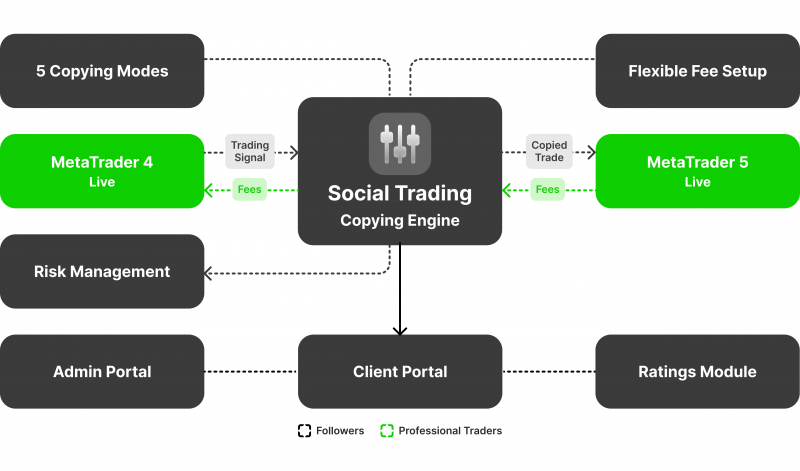
Local version shares files instantly, ideal for high-frequency trades. Remote copiers risk server downtime.
For instance, during NFP news, Local copies 95% of trades vs. 80% remote. Prerequisites: same symbols on accounts, magic number match.
Pricing: Local at $149, Forex Copier $197, DupliTrade ongoing.
What Makes a Trade Copier “Best” for MT4?
A top MT4 copier offers one-click install, equity stop risk management, and broad broker compatibility like IC Markets or XM. Criteria focus on ease and safety.
One-click means drag-drop EA, auto-config. Risk tools halt at 20% drawdown.
Broker fit covers 90% MT4 hosts, avoiding FIFO rules.
What Are the Best Signals for MT4 Copy Trading?
Best MT4 copy trading signals are from MQL5 signals (win rates 70%+), ZuluTrade MT4 integration, and ForexSignals.com with low drawdowns under 10%. Let’s explore evaluation and subscription.
MQL5 hosts 10,000+ signals. Filter by Sharpe ratio >1.5, growth, trades/month. Top like “Scalper Pro” shows 300% yearly, verified.
ZuluTrade bridges MT4. Leaders average 65% win, 12% max drawdown. Percent allocation scales risk.
ForexSignals.com offers room access plus MT4 links. Pros track 80% accuracy.
Subscribe via MT4: Tools > Options > Signals tab, paste key.
How Do You Choose Reliable Copy Trading Signals?
Choose signals by metrics like Sharpe ratio over 1.2, steady monthly returns above 5%, and third-party verification. Free options lag paid in consistency.
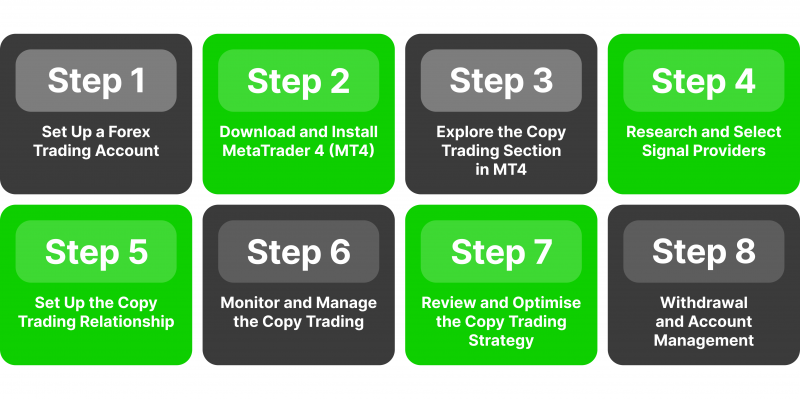
Sharpe measures risk-adjusted returns. Aim 1.5+.
Monthly returns beat volatile spikes. Verified via Myfxbook.
Paid ($30/month) outperform free by 25% long-term.
Are There Free Signals Compatible with MT4 Copiers?
Free signals work with MT4 copiers through MQL5 community, like “Free Forex Signals” (68% win, 8% drawdown) and “Demo Scalper” (200% growth). Examples abound.
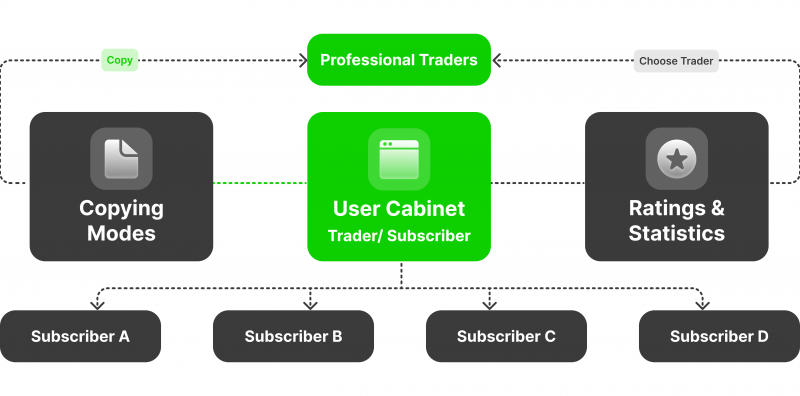
MQL5 free tier has 500+ options. “Gold Hunter” logs 150% yearly.
Compatible via signal EA on master.
How to Set Up Copy Trading on MT4 Step-by-Step?
Set up MT4 copy trading in 6 steps using Local Trade Copier EA, linking master to slaves for automatic trade replication with risk controls. This guide covers install to live.
Download EA from Forex Expert Advisor Store. Test on demo first.
Step 1-3: Install MT4 Copier EA and Configure Master Account
Steps 1-3 install the copier EA, attach to master chart, and set provider mode with filters. Start with download.

1. Get Local Trade Copier .ex4 file from store. Unzip to MT4’s Experts folder.
2. Restart MT4, drag EA to blank chart. Enable “Allow live trading” and “DLL imports.”
3. Set Provider mode. Input trade filters: symbols (EURUSD,GBPUSD), max lots 0.1, news filter on.
Magic number unique, like 12345. Apply.
Step 4-6: Link Slave Account and Start Copying Signals
Steps 4-6 configure slave, set lot multiplier and risks, then demo test before live. Seamless linking.
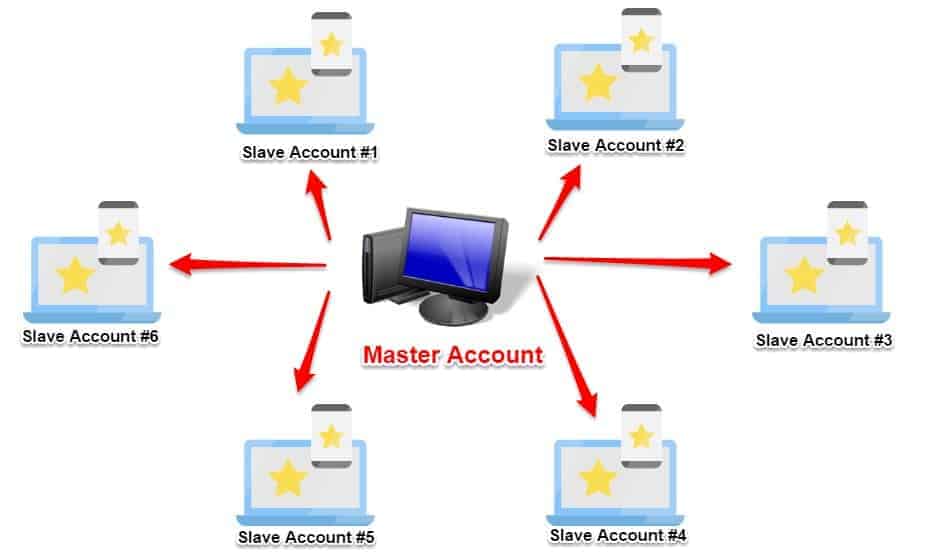
4. Open slave MT4, attach EA in Copier mode. Point to master folder path.
5. Set lot multiplier (e.g., 1:1 or balance-based 0.01 per $1000). Risk: equity stop at 10%.
6. Demo 1 week, check logs for 100% copy rate. Switch to live.
Monitor via journal tab. Adjust for broker time zones.
Advanced Configurations and Comparisons for MT4 Copy Trading
MT4 copy trading excels in VPS integration for nonstop operation and custom risk modules, while offering multi-broker arbitrage options not always matched in MT5 setups.
Furthermore, these configurations allow traders to fine-tune performance beyond basic setups.
How Does MT4 Copy Trading Differ from MT5 Versions?
MT4 copy trading relies on a single-threaded architecture, which processes orders sequentially, unlike MT5’s multi-threaded system that handles multiple tasks at once for quicker execution. This makes MT5 better for high-frequency strategies where milliseconds count. MT4 often faces limitations with hedging, as some brokers enforce FIFO rules that prevent opposite positions on the same pair, forcing traders to close existing trades first. MT5 supports full hedging by default, allowing simultaneous buy and sell orders without interference.

You’ll notice MT4 copiers like Local Trade Copier emphasize simplicity and broad broker compatibility, ideal for beginners. MT5 versions, such as those from FX Blue, provide advanced depth-of-market data for precise entry points. Setup times differ too: MT4 requires manual symbol matching across accounts, while MT5 auto-detects with its unified symbol system. Latency in MT4 can spike during market opens due to its older engine, but pairing it with a VPS minimizes this.
In practice, MT4 suits retail traders focused on signal copying, whereas MT5 appeals to those scaling with algorithmic complexity.
What stands out in these differences?
- Execution speed: MT5 reduces slippage by up to 30% in volatile conditions through parallel processing.
- Hedging flexibility: MT4’s broker-dependent rules contrast MT5’s native support for multiple positions.
- Resource use: MT4 runs lighter on standard PCs, avoiding MT5’s higher CPU demands.
What Are Unique Risk Management Features in Top MT4 Copiers?
Top MT4 copiers incorporate equity protection that halts copying if account drawdown exceeds a set percentage, such as 10%, preserving capital during losing streaks. A news filter pauses trades 30 minutes before and after high-impact events like NFP releases, dodging volatility spikes. Correlation avoidance scans portfolios to block copying of highly correlated pairs, like EURUSD and GBPUSD, preventing amplified losses.

For example, premium EAs from Forex Expert Advisor Store include dynamic lot scaling based on master account performance, adjusting slave sizes in real time. These tools go beyond basic stop-losses by monitoring overall exposure. Custom modules let users set maximum daily loss limits or equity trails that tighten as profits grow.
Traders often overlook how these features integrate with VPS for uninterrupted monitoring, ensuring rules apply 24/7.
How do these elevate safety?
- Equity stop: Automatically closes all trades and disables copying at predefined drawdown levels.
- News integration: Syncs with economic calendars to filter Forex Factory events by impact rating.
- Anti-correlation logic: Calculates pair correlations over 100-bar periods, rejecting trades above 0.8 threshold.
Can MT4 Copiers Integrate with Specific Brokers Like IC Markets?
Yes, MT4 copiers integrate seamlessly with IC Markets through broker-specific symbol mappings and latency tweaks for their ECN accounts. IC Markets’ raw spreads and fast servers pair well with copiers like Remote Trade Copier EA, which optimizes ping times under 1ms via dedicated VPS setups. Users map symbols manually, such as “EURUSD.raw” on slave to master, ensuring exact replication.

ECN optimization involves enabling one-click trading and disabling requotes in EA settings. For multi-account managers, IC Markets supports up to 100 sub-accounts, with copiers handling proportional scaling. Rare multi-broker arbitrage lets you copy from a low-spread master on IC Markets to higher-leverage slaves elsewhere, exploiting price differences.
This setup shines for scalpers, as IC Markets’ execution speed complements MT4’s strengths.
What makes this integration effective?
- Symbol customization: Adjusts for broker suffixes like “.pro” to match IC Markets formats.
- Latency reduction: VPS colocated in Sydney servers cuts delays to sub-50ms round-trip.
- ECN compatibility: Handles market orders without dealing desk interference, minimizing rejections.
What Are Common Troubleshooting Issues in MT4 Copy Trading?
Sync delays arise from high latency or mismatched time zones between master and slave, fixed by using a VPS synced to broker servers. Order rejections stem from lot size mismatches or insufficient margin; solutions include auto-scaling settings in copiers like FX Copier. High spreads during news, the opposite of low-spread ideals, trigger filters that pause activity until conditions normalize.

Another issue is opposite trades firing erroneously due to signal misreads, resolved by verifying bidirectional copying flags. Platform freezes occur with too many charts; limit to essentials and restart MT4 periodically. Log analysis reveals most problems, like “invalid stops” from wide gaps, countered by slippage tolerances up to 5 pips.
Rhetorical question: Ever faced a smooth setup turning chaotic mid-session? These fixes restore reliability.
How to address key problems?
- Delay fixes: Align GMT offsets and test ping with broker demo first.
- Rejection prevention: Set dynamic lot multipliers based on account balance ratios.
- Spread management: Activate filters for spreads over 2 pips, resuming post-normalization.
