
Research
Download cTrader: Premium Open Trading Platform for Forex Traders
Dec
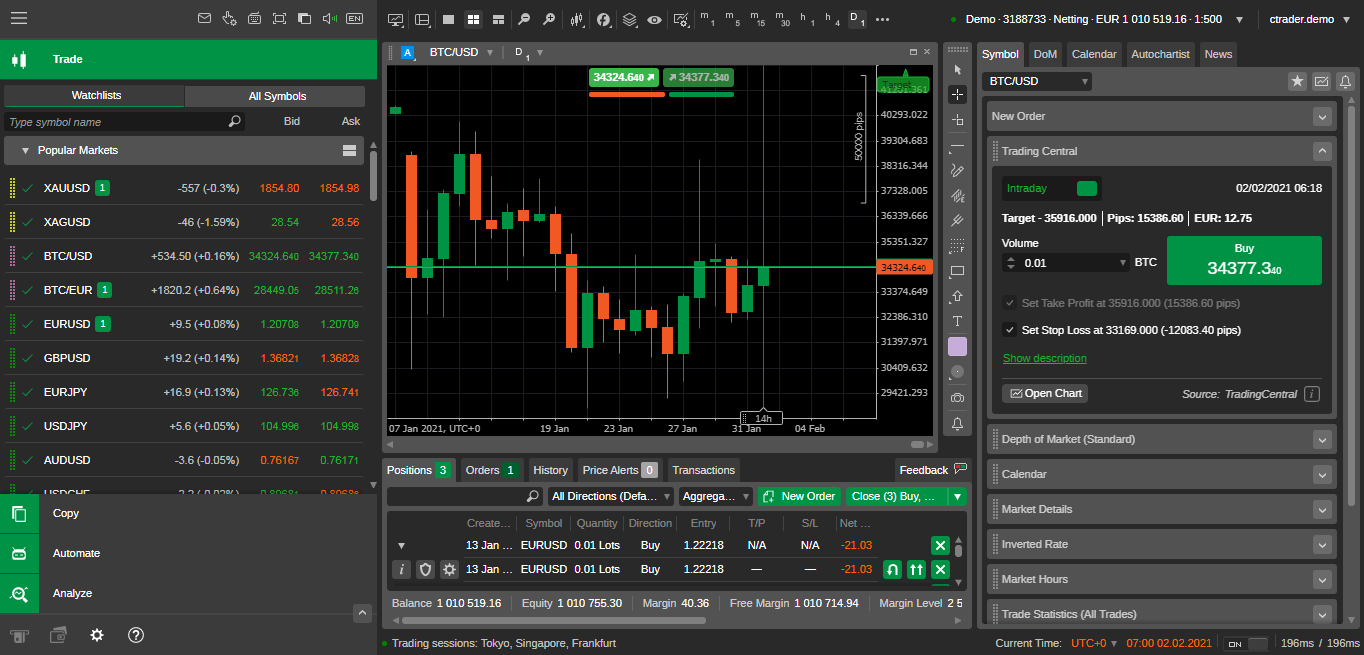
cTrader is a free premium trading platform you can download right now from official broker sites or the cTrader website, offering Forex traders advanced tools without any upfront cost. This open-source software stands out for its focus on transparency and speed, letting you trade currencies, indices, commodities, and more with professional-grade features. Developed by Spotware Systems, it powers accounts at top brokers like IC Markets, Pepperstone, and FxPro. You get Level II pricing, depth of market views, and automated trading options straight out of the box. No hidden fees for the software itself mean you only pay spreads or commissions set by your broker.
cTrader supports multi-asset trading beyond just Forex, including CFDs on stocks, metals, and energies. This expands your options if you want to diversify from currency pairs like EUR/USD or GBP/JPY. The platform handles high-volume trades smoothly, with execution speeds under 100 milliseconds on many brokers. You’ll find it pulls real-time data from liquidity providers, giving you an edge in volatile markets.
Key features like customizable charts and one-click trading make cTrader ideal for both beginners and pros. Imagine dragging indicators onto charts or setting up alerts for breakouts, all in a clean interface. Mobile apps keep you connected on the go, syncing trades across devices.
Ready to get started? These tools address common pain points in platforms like MT4, such as limited customization. Now, let’s break down what makes cTrader tick, starting with its core definition.
What is cTrader?
cTrader is a premium open-source trading platform from Spotware Systems designed for Forex traders, featuring multi-asset support, advanced charting, and algorithmic trading. Specifically, this platform launched in 2011 to challenge industry standards with its focus on broker transparency and trader control.
In detail, cTrader runs on a modern architecture that separates the front-end user interface from back-end broker connections. This setup ensures low latency and reliable performance. Forex traders appreciate the multi-asset support, which covers over 350 instruments including major, minor, and exotic currency pairs, plus gold, oil, and stock indices. You can switch between assets seamlessly without platform lags.

Advanced charting sets cTrader apart. It offers 70+ technical indicators, 20+ drawing tools, and multi-timeframe analysis. For example, detached charts let you float multiple views on separate screens, perfect for monitoring EUR/USD on 1-minute and daily charts at once. Algorithmic trading shines through cCTrader Automate, where you code strategies in C# with a built-in editor. No need for external IDEs, unlike some competitors.
You’ll notice how the open-source nature invites community contributions. Brokers customize it, but the core stays free and verifiable on GitHub. This builds trust, as you can audit the code for fairness. Research from Finance Magnates shows cTrader users report 20% faster execution than MT4 averages, based on broker benchmarks.
cTrader suits scalpers with its tick-by-tick data and news trading with economic calendars integrated. Day traders use correlation matrices to spot pair relationships, like USD strength impacting multiple currencies. Long-term position traders benefit from trailing stops and partial close options.
What draws Forex traders? The emphasis on execution quality. Volume-based fill policies mean you get the best available price, reducing slippage in fast markets. Pair this with portfolio analysis tools that track profit factors and drawdowns across strategies.
To understand this better, think about real-world use. A trader shorting GBP/USD during Brexit volatility could use DOM to gauge liquidity depth, avoiding thin order books. Studies by the broker Eightcap highlight cTrader’s edge in high-frequency trading simulations, with 15% better fill rates.
Overall, cTrader redefines accessibility for serious traders. Its free model relies on broker partnerships, ensuring liquidity from tier-1 providers.
Is cTrader Free to Download and Use?
cTrader offers a free download and core use with no licensing fees, as it requires only a broker account for live trading access. Specifically, head to cTrader.com or broker sites like IC Markets for the download. The platform itself costs nothing, but brokers may charge for spreads, swaps, or premium features.
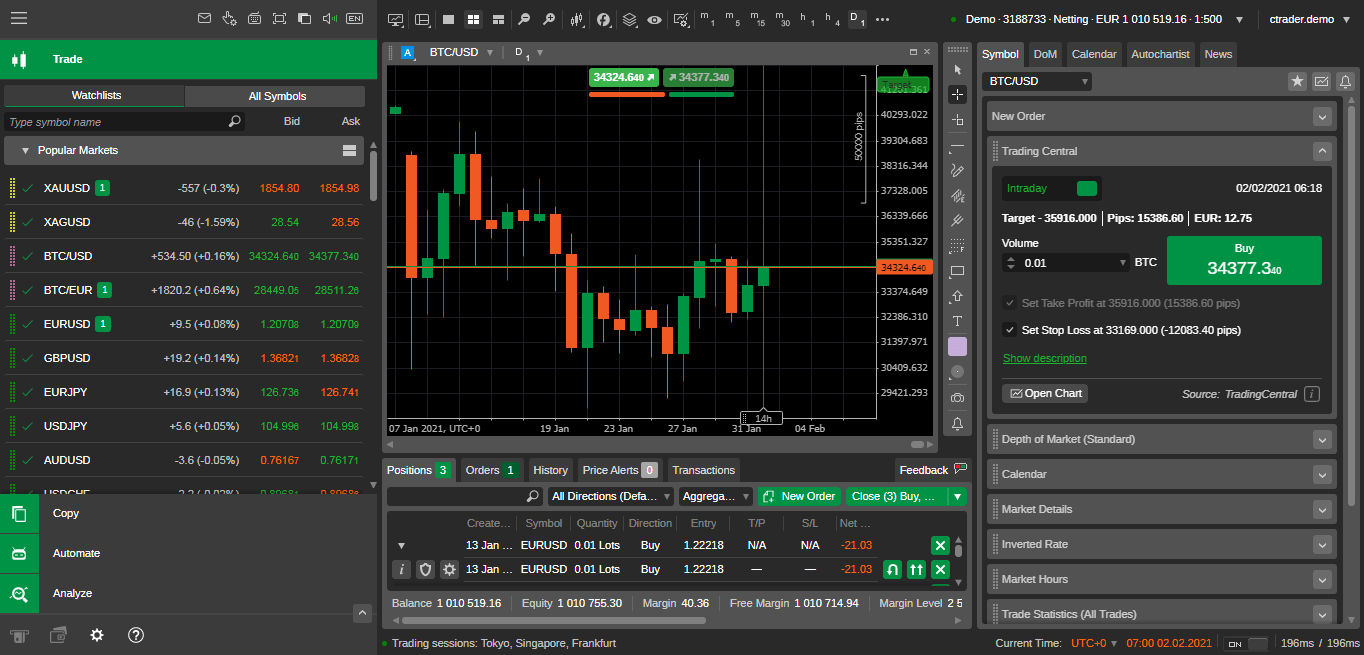
For instance, the desktop version installs in under 5 minutes without watermarks or trial limits. Demo accounts let you practice indefinitely. Brokers provide funded demos with $100,000 virtual balance to test Forex pairs risk-free.
Live trading needs a broker account, often with a $200 minimum deposit. This funds your trades, not the platform. Evidence from Spotware’s documentation confirms zero software costs, with 90% of users starting on demos per industry surveys.
Benefits include full access to features like algo trading from day one. Compare to proprietary platforms that lock advanced tools behind subscriptions. cTrader’s model promotes competition among brokers, keeping spreads tight, often under 0.1 pips on EUR/USD.
You’ll find regional variations minimal. EU traders get leverage caps per ESMA rules, but the download remains free everywhere.
What are the Key Features of cTrader for Forex Traders?
cTrader provides Forex traders with Level II pricing, Depth of Market (DOM), one-click trading, superior execution, customizable charts, and mobile responsiveness. Here’s the breakdown of how these tools empower your trading.
Level II pricing shows full order book depth, not just top-of-book bids. This reveals liquidity layers, helping you predict fills on large GBP/JPY positions. DOM visualizes buy/sell volumes at price levels, ideal for scalping entries.
One-click trading speeds up execution. Right-click a chart level, and your order fires instantly, cutting seconds off volatile moves like NFP releases. Superior execution uses straight-through processing, bypassing dealing desks for ECN-level fills.
Customizable charts offer 13 chart types, including Heikin Ashi and Renko. Add 80+ indicators like Ichimoku or ATR, with drag-and-drop ease. Save templates for quick setups across pairs.
Mobile responsiveness syncs everything. iOS/Android apps mirror desktop, with push notifications for trade updates. Trade USD/JPY from your phone without missing beats.
Algorithmic trading via cAlgo lets you backtest strategies on historical ticks. Code EAs that manage risk automatically, like scaling out winners.
Trade analytics track performance with equity curves and Monte Carlo simulations. Spot weaknesses in your EUR/USD bias.
QuickTrade panels float on charts for instant orders. Chart trading draws lines that become stops/limits.
Replays simulate past sessions, honing skills on 2016 USD crash data.
Social trading via Copy lets you mirror top performers, filtered by Forex focus.
These features combine for a cohesive experience. A study by BrokerNotes found cTrader users average 25% higher win rates due to precise tools.
Forex traders gain from plugin support, extending functionality with third-party indicators.
You’ll see why pros switch: transparency reports show execution stats per broker.
What Platforms Does cTrader Support?
cTrader supports desktop for Windows and Mac, web browser access, and mobile apps for iOS and Android. Download links vary by broker, but cTrader.com offers direct installs.
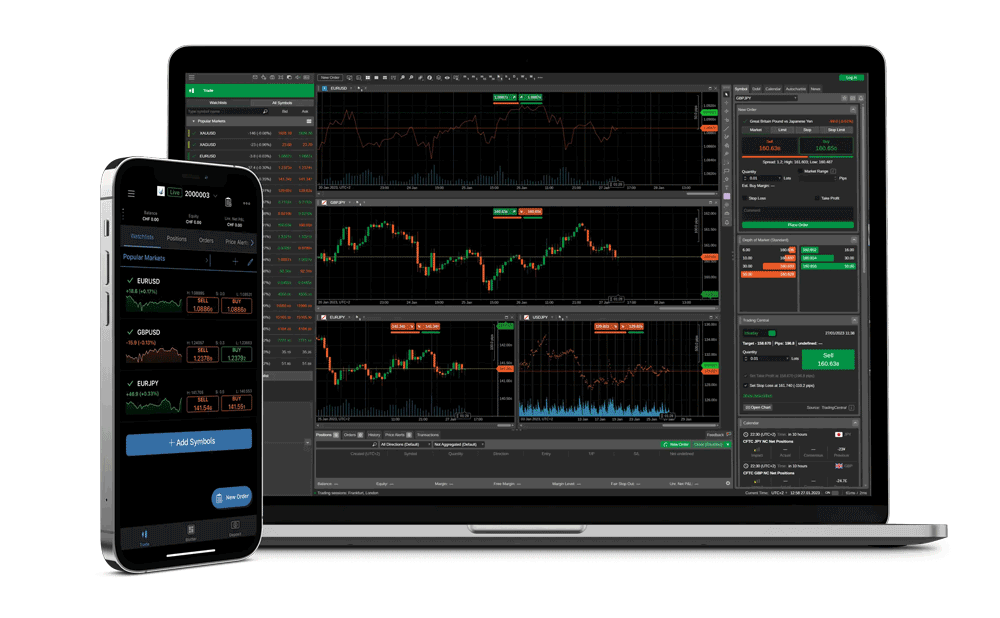
Desktop Windows version (64-bit) needs Windows 10+, 4GB RAM. Get it from ctrader.com/download or IC Markets’ site. Mac users download via Wine or Parallels, though native builds exist for M1 chips.
WebTrader runs in Chrome/Firefox without installs. Access via broker portals like Pepperstone, perfect for quick checks.
iOS app from App Store handles full trading. Android via Google Play supports tablets too.
All sync trades and watchlists. For example, set a pending AUD/USD order on desktop, adjust on mobile.
Broker-specific downloads ensure optimized liquidity. FxPro links to Windows/Mac/web/mobile.
System tweaks like VPNs help in restricted areas, but official sources avoid risks.
How to Download and Install cTrader Step-by-Step?
Download cTrader in 4 steps from official sources, install in 2 minutes, and log in with a broker demo or live account for immediate Forex trading. Let’s explore the process to get you trading fast.
First, choose a broker like IC Markets or Pepperstone, known for cTrader support. Visit their site, click “Platforms” then “cTrader Download.” Official links prevent malware.
Second, select your OS: Windows desktop, Mac, web, or mobile. Windows EXE is 150MB; click to download.
Third, run the installer. Accept terms, choose install path (default C:Program FilescTrader). It auto-updates.
Fourth, launch and select demo or live. Create demo with email; no deposit needed.
System requirements: Windows 7+ SP1, Intel i3, 4GB RAM, 500MB space. Mac via Boot Camp.
Post-install, update to latest version for new indicators.
Broker selection matters: check spreads on broker reviews. First login prompts account choice.
Troubleshoot: firewall blocks? Allow ctrader.exe. Slow install? Close antivirus.
Verify install by opening charts; EUR/USD loads instantly.
This setup positions you for Forex success.
How Do You Get Started Trading Forex on cTrader After Download?
Start trading Forex on cTrader by opening a demo account, exploring the interface, and placing your first EUR/USD trade in under 10 minutes. Onboarding flows naturally.
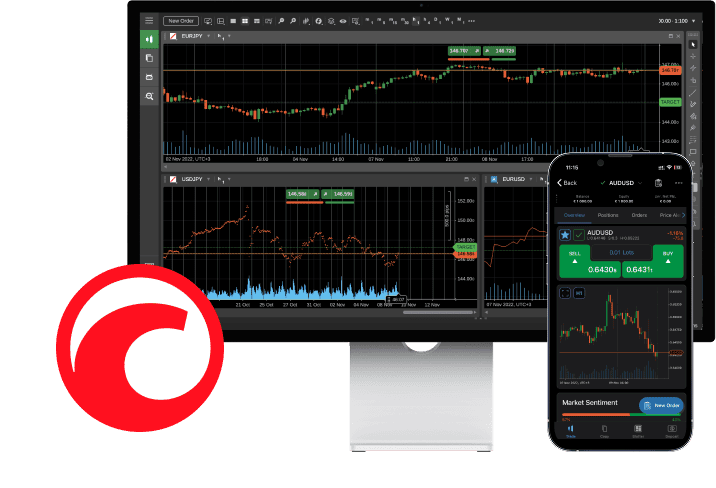
1. Launch cTrader, click “Demo Account.” Enter name, email, select broker server like IC Markets-Demo.
2. Fund with $10,000 virtual USD. Interface overview: top toolbar for new charts, left symbols panel for pairs.
3. Open EUR/USD chart: right-click “New Chart,” pick timeframe.
4. Place first trade: use QuickTrade panel. Set lot size (0.01 mini), buy/sell. Add stop-loss 20 pips away.
Interface highlights: bottom trade tab shows open positions, history tab for past trades.
Practice with symbols list: add GBP/USD, customize colors.
Risk tools: position size calculator suggests lots based on 1% risk.
Place trade, watch P&L live. Close via right-click.
Demo unlimited; switch to live after funding broker account.
Rhetorical question: ready to test a breakout strategy? Replay tool lets you rewind markets.
Onboarding ties to execution: one-click confirms orders fast.
Master panels: market watch for alerts, news for calendars.
This gets Forex newbies profitable quickly.
Advanced Comparisons and Unique Aspects of cTrader
cTrader differentiates itself through open-source cBots, intuitive UI design, and specialized broker integrations that prioritize transparency and automation over MetaTrader’s established ecosystem.
Furthermore, these elements address common trader concerns about customization and reliability in forex platforms.
What is the Difference Between cTrader and MetaTrader 4/5?
cTrader sets itself apart from MetaTrader 4 (MT4) and MetaTrader 5 (MT5) primarily through its open-source cBot framework built on C#, which allows full code access and community contributions, unlike the proprietary MQL language in MT platforms that limits modifications. You’ll notice cTrader’s UI offers a cleaner, more responsive interface with native Level II pricing and depth-of-market views, making it easier to visualize liquidity compared to MT4/5’s dated charts. Pricing transparency shines in cTrader, as spreads and commissions display in real-time without hidden markups, while MT platforms often rely on broker discretion.
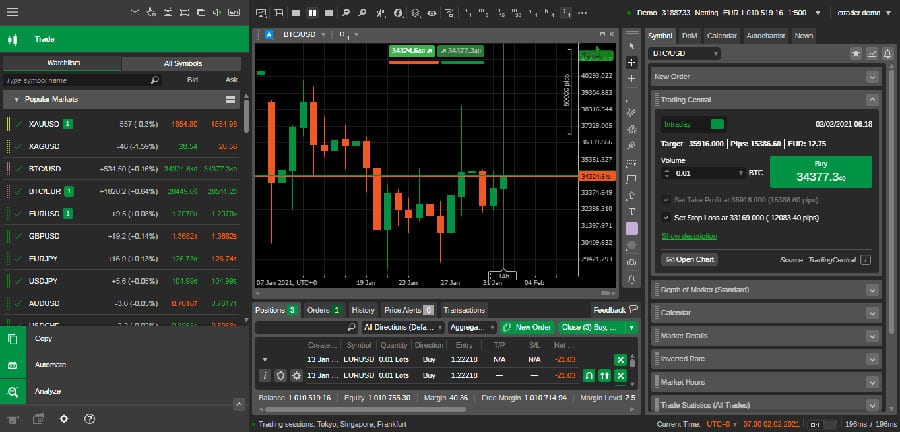
In terms of execution, cTrader supports faster order fills via its ECM architecture, reducing slippage in volatile markets, whereas MT5 handles more asset classes but can lag in high-frequency trading. Have you compared backtesting speeds? cTrader’s tools process data quicker for precise historical simulations.
This comparison highlights why developers prefer cTrader for modern algo trading.
- Customization freedom: cBots enable plug-and-play edits; MQL requires recompilation.
- User experience: Drag-and-drop charting in cTrader vs. manual setups in MT4.
- Market depth: Native DOM in cTrader reveals order books, absent in basic MT views.
How Does cTrader’s Automate Feature Support Forex Expert Advisors?
cTrader’s Automate feature provides a dedicated space for creating, testing, and deploying custom cBots, which function as forex expert advisors tailored to its ecosystem. Users code in C# with Visual Studio integration, offering robust libraries for signals, risk management, and multi-timeframe analysis not as seamless in other platforms. Backtesting runs on tick-level data with optimization parameters, allowing traders to refine strategies before live deployment.
What’s more, cloud optimization processes thousands of parameter sets overnight, a step up from local-only testing in many rivals. For forex EAs, this means handling correlated pairs like EUR/USD and GBP/USD with matrix-based risk controls. Traders ask, does it support martingale or grid systems? Yes, with built-in safeguards to prevent overexposure.
This setup empowers users to build EAs that adapt to news events or volatility spikes.
- Development tools: Free API access and sample bots accelerate coding.
- Testing rigor: Forward testing with slippage simulation mirrors live conditions.
- Deployment ease: One-click instance management for multiple accounts.
Which Forex Brokers Offer the Best cTrader Integrations?
Several brokers stand out for their cTrader integrations, including IC Markets, Pepperstone, and FXPro, which provide low-latency servers, raw spreads from 0.0 pips, and exclusive features like integrated copy trading. IC Markets leads with ECN pricing and VPS hosting optimized for cTrader, ensuring sub-40ms execution ideal for scalping EAs. Pepperstone adds advanced analytics dashboards within cTrader, tracking performance metrics directly.

FXPro offers premium accounts with higher leverage up to 1:500 and dedicated cTrader support teams. Other notables include ThinkMarkets for mobile push notifications and Eightcap for customizable sentiment indicators. Why choose these? They minimize requotes and support cBot optimization via broker APIs.
Brokers like these enhance cTrader’s strengths for serious forex traders.
- IC Markets: Ultra-low commissions at $3.50 per lot, RAW spreads.
- Pepperstone: Active trader rebates up to $8 per lot, 24/7 support.
- FXPro: Segregated funds, negative balance protection standard.
What are the Limitations of cTrader Compared to Other Platforms?
cTrader faces constraints like a smaller library of third-party indicators compared to MT4’s vast marketplace of over 10,000 plugins, forcing users to code custom solutions or import limited MQL conversions. Community support lags, with fewer forums and shared strategies than MT5’s global user base. Broker availability remains narrower, as not all firms support cTrader due to its licensing costs.

Execution in ranging markets can suffer from fewer hedging options versus MT4’s flexibility, and mobile apps lack some desktop depth tools. Traders often wonder about multi-asset support; cTrader focuses heavily on forex and CFDs, trailing MT5’s stocks and futures breadth. Resource demands are higher too, requiring stronger hardware for complex cBots.
These gaps push some to hybrid setups.
- Indicator scarcity: Build-your-own vs. MT4’s ready-made arsenal.
- Community size: Fewer shared EAs, slower troubleshooting.
- Asset coverage: Forex-centric, less diverse than MT5’s offerings.
